
Sources de téléchargement
Device Configuration
Guide d'installation des APKs divisées (Split APKs)
Certaines applications sont distribuées sous forme d'APKs divisées (plusieurs fichiers .apk groupés) pour optimiser les ressources. Les installateurs Android standard ne peuvent pas les ouvrir.
Applications Connexes




Nouveautés
- Crash issues resolved
À propos de cette application
TURN YOUR SMARTPHONE INTO A POWERFUL NAVIGATION SYSTEM
Explore your environment with the best maps, travel the most spectacular routes, improve your performance and, above all, practice your outdoor activities in complete safety. Take your outings to a new level.
_______________________
ADAPT THE APP TO YOUR SPORT
TwoNav can be adapted to different sports, such as hiking, cycling, motor sports, flying, water sports... Create your profile and the app will adapts its configuration to this sport. Do you practice other sports? Create different profiles.
_______________________
SAFE EXPLORATION
Follow your route and keep under control the distance, time and ascent to reach your goal. Explore routes created by you, downloaded or calculate your route automatically. The App will notify if you deviate from tour course or if you run into something unforeseen.
_______________________
SIMPLE AND INTUITIVE GPS NAVIGATION
Forget the old roadbooks on paper. Your roadbook is now digital, everything you need to know is on the screen of your smartphone. The Aapp tells you turn by turn which road to follow.
_______________________
TRAINING TOOLS
You decide whether you train by time, by distance... or compete against yourself with TrackAttack™. Improve your performance from a previous training session. The app tells you whether you exceed your previous performance or whether you need to improve.
_______________________
CREATE YOUR OWN ROUTES AND WAYPOINTS
Create routes and waypoints by pressing directly on the screen, organize them in folders and collections. You can also enrich your references by adding photos and videos.
_______________________
OPTIMIZE YOUR PERFORMANCE
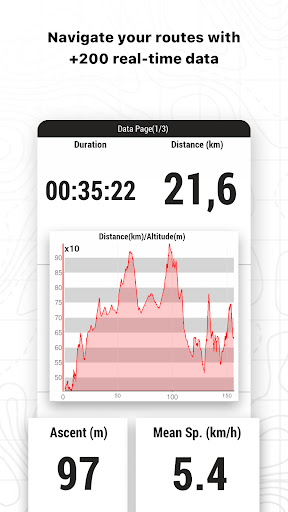
Monitor the most relevant data of your activity such as distances, speed, times and altitudes. The App will show data for what you have covered so far and what is still ahead of you.
_______________________
VISIBLE AND AUDIBLE ALARMS
Set how far you want to go, set alarms, the app will warn you if you exceed the limits you have set (heart rate, speed, altitude, route deviation...).
_______________________
BROADCAST YOUR LOCATION LIVE
With Amigos™ you will be able to share your location live wherever you are. This ensures your safety and that of your loved ones.
_______________________
DETAILED ANALYSIS OF YOUR ROUTES
Back at home, analyze your routes with detail and accuracy. Relive every stage of your adventure with graphs, laps, +120 data fields...
_______________________
CONNECT WITH THE WORLD
Keep your activities in a safe and accessible place thanks to the GO Cloud (30 MB free). Connect to other services such as Strava, TrainingPeaks, Komoot, UtagawaVTT or OpenRunner, synchronize your activities or download your best routes.
_______________________
WEATHER FORECAST
Get weather reports from anywhere in the world for the coming days, broken down by time slot. Access data such as temperature, cloud cover, rain, snow, and storm probability.
_______________________
UPGRADE YOUR ADVENTURES
Don’t settle for the FREE version of the TwoNav App — upgrade your experience with our subscription plans and unlock advanced features that match your needs:
- MOBILE: Create your routes in the TwoNav App with easy-to-use tools. Track your remaining distance. Get off-route alerts and always find your way back.
- PREMIUM: Automatically create the best routes in the App and add Land to your computer. Check the weather forecast. Download detailed maps from around the world. Enjoy 3D views.
- PRO: Create your own custom maps in Land. Open maps from other sources in special formats. View weather maps with multi-day forecasts.
_______________________
Comment télécharger l'APK de TwoNav 6: Routes and Maps
- Entrez le nom du paquet
com.compegps.twonavsur la page d'accueil d'APK Downloader. - Sélectionnez l'architecture de votre appareil (ARM64 recommandé pour les appareils récents).
- Cliquez sur Télécharger pour obtenir le fichier APK fusionné.
- Transférez et installez l'APK sur votre appareil Android.
- Restez à jour: Visitez régulièrement APK Downloader pour rechercher et télécharger les dernières versions sécurisées de vos applications préférées.
Sécurité et Vérification de Signature
Ce téléchargement APK est 100% sûr. Nous vérifions que la signature cryptographique du fichier correspond aux informations d'identification officielles du développeur. Aucune modification ni adware n'est injecté.