
Sources de téléchargement
Device Configuration
Guide d'installation des APKs divisées (Split APKs)
Certaines applications sont distribuées sous forme d'APKs divisées (plusieurs fichiers .apk groupés) pour optimiser les ressources. Les installateurs Android standard ne peuvent pas les ouvrir.
Applications Connexes




Nouveautés
-Minor bug fix
-Added option to change theme
À propos de cette application
Wake up better and feel more energized with the “Simple Alarm Clock - Challenge Alarm Clock” app.
Challenge Alarm Clock is the app for heavy sleepers and people who can't get out of bed.
Simple Alarm Clock
a simple, Extremely easy-to-use interface
Easily create a new alarm.
Allows you to create unlimited alarms
Alarms sorted in the order they will ring.
Support sleep timer setting
There are fun challenges for you before you turn off the alarm.
Easily edit, delete alarms
Carefully selected alarm clock sounds
Alarm clock for heavy sleepers
Simple, Reliable, Precise : The Clock features a reliable alarm clock
Alarm Ringtone
- Alarm ringtone options
- Alarm Tone
- A collection of high-quality Alarm Tone
- Lots of options for the alarm sound
- Varied alarm ringtones available for you to set as ringtone
Challenges Alarm Clock
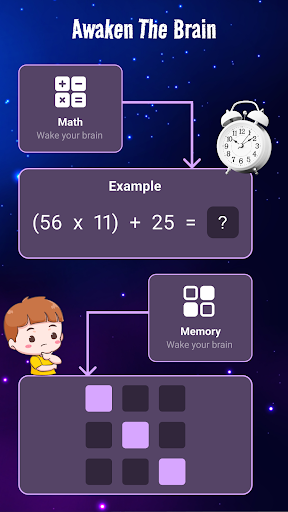
This Alarm Clock app offers many different challenges such as puzzles, games, memory, math and retype. Complete the tasks when you wake up so you can't dismiss it and go back to sleep.
The only way to turn off the loud alarm is to complete the challenges.
In order to avoid disabling your alarm accidentally, you are able to set your alarm clock to ask math challenges to dismiss.
Choose up to 4 of challenges:
- Math – Solve math problems. You get to choose the difficulty level: Super easy, very easy, Easy, Normal, Hard, Very hard.
- Memory – find pairs for each coloured tile. 80% of users are using memorided games to dismiss the alarm for waking up completely.
- Rewrite – carefully rewrite text. Seems simple, but try to do that as soon as the wake up alarm rings. You can also get motivation from these very texts.
The perfect challenges alarm clock for heavy sleepers.
With these challenges you will never oversleep again.
Main Features
Set your Alarm easily
Set custom labels for alarms.
Extra loud volume Alarm Clock
Repeat alarms every week on certain days.
Multiple alarm support: you can set up many alarms at once. you'll never oversleep or miss an important event!
Set multiple alarms with different tunes
Wake up you from your night's sleep or short naps
Easily set an alarm to ring in 15 minutes, 30 minutes or 45 minutes.
Add alarm: Enter required time and start timer. You can set as many timers as you want for activities like exercise. For example: alarm clock for 6 a.m for walking, alarm clock 8 in the morning…
Allows easy setting of repeat intervals
Jump-start your brain by solving math problems to snooze/dismiss the alarm
Enter required time and start timer. You can set as many alarms as you want for activities like exercise, cooking, and more!
Snooze: Disable snooze or limit it. It is also possible to shorten the snooze duration.
With this alarm clock you sure will get up on time. Download and experience now!
wake up instantly with the “Simple Alarm Clock” application!
Download and install now!
Thank you for downloading, using and supporting our app! <3
Note
RESPECT FOR YOUR PRIVACY: No login is required to use the app. We don’t collect your personal details.
Comment télécharger l'APK de Simple Alarm Clock
- Entrez le nom du paquet
com.AlarmClock.LoudAlarm.ChallengesAlarmClocksur la page d'accueil d'APK Downloader. - Sélectionnez l'architecture de votre appareil (ARM64 recommandé pour les appareils récents).
- Cliquez sur Télécharger pour obtenir le fichier APK fusionné.
- Transférez et installez l'APK sur votre appareil Android.
- Restez à jour: Visitez régulièrement APK Downloader pour rechercher et télécharger les dernières versions sécurisées de vos applications préférées.
Sécurité et Vérification de Signature
Ce téléchargement APK est 100% sûr. Nous vérifions que la signature cryptographique du fichier correspond aux informations d'identification officielles du développeur. Aucune modification ni adware n'est injecté.