
Fuentes de descarga
Device Configuration
Guía de instalación de APKs divididas (Split APKs)
Algunas aplicaciones se distribuyen como APKs divididas (varios archivos .apk empaquetados juntos) para optimizar recursos. Los instaladores estándar de Android no pueden abrirlas.
Aplicaciones Relacionadas




Novedades
🎠 Carousel Templates: Design seamless, customizable IG posts with flexible layouts.
✨ Seasonal Drops: Graduation, Eid al-Adha & game-day collage packs.
Acerca de esta aplicación
InCollage, a full-featured Photo Collage Maker & Photo Editor, offers 500+ picture collage layouts, frames, backgrounds, templates, stickers & text fonts to create stunning photo collages. It's your ultimate pic collage maker to customize layouts fit for every occasion, including holidays, weddings, babies, Before & After, and more.
Features:
• NEW: One tap to transform your selfies into 90+ playful AI avatars! New styles keep dropping.
• Improve the quality and clarity of old, blurry, or pixelated photos effortlessly with our AI photo enhancer.
• Collage maker that combines up to 25 photos to create aesthetic pic collages.
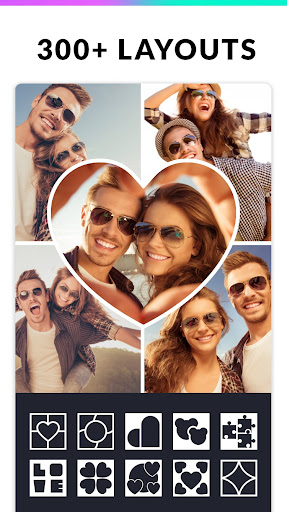
• 300+ Layouts of photo frames or grids to choose from!
• Pick a picture, add text and share funny Memes with friends.
• Massive library of Backgrounds, Stickers, Fonts, and doodles to choose from!
• Remove and replace backgrounds seamlessly with our AI-powered background remover.
• Support importing your own fonts with special art styles!
• Easily change the ratio of picture collages and edit borders.
• Make photo collages with Free style or Grid style.
• Crop pictures and edit photos with stylish Layouts, Filters, and Text.
• Create Insta square photos with blurred backgrounds perfectly sized for Instagram.
• Save photos in high resolution and share pictures directly to Instagram, Facebook, WhatsApp, Snapchat, etc.
📷 Photo Frames & Layouts
InCollage pic collage maker supports tons of layouts, photo frames, and photo effects that make your moments stunning. Find the perfect fit with love, anniversary, holiday, & baby photo frames. It's the ultimate collage maker that brings your memories to life.
📷 Meme Generator
This pic collage maker is also a go-to meme generator. Create hilarious memes, add bold text, and share them on WhatsApp, Snapchat, Messenger, etc. You really can't miss this ace collage maker!
📷 AI Photo Editor & Retouch
Elevate your photos with powerful AI tools! Use the AI Remove to magically delete people, remove text and watermarks, or clear messy backgrounds. Fix blurry images with the AI Enhancer, or swap backgrounds in seconds. Get pro-quality, natural-looking results without any editing skills.
📷 Photo Editor PRO
With a bunch of powerful photo editing tools, you can easily crop a photo, apply trending filters, add stickers & text, draw on photos, flip, rotate, and much more. InCollage is truly an intuitive photo editor for your aesthetic Instagram feed.
📷 Pic Collage Editor for Instagram
An easy-to-use picture collage maker with trendy layouts designed specifically for Instagram. It supports multiple ratios (e.g., 1:1, 3:4, 5:4, 9:16). Share your collages and retouched photos with friends on Facebook, Twitter, and WhatsApp in high resolution.
InCollage - Photo Collage Maker & Photo Editor is your pocket collage maker, meme generator, pic stitch app, and AI photo editor for social media and printing. If you have any problems or suggestions, feel free to let us know. Email: photostudio.feedback@gmail.com
Cómo descargar Photo Editor - Collage Maker APK
- Ingrese el nombre del paquete
photocollage.photoeditor.collagemakeren la página de inicio de APK Downloader. - Seleccione la arquitectura de su dispositivo (se recomienda ARM64 para dispositivos modernos).
- Haga clic en Descargar para obtener el archivo APK fusionado.
- Transfiera e instale el APK en su dispositivo Android.
- Manténgase actualizado: Visite APK Downloader regularmente para buscar y descargar las últimas versiones seguras de sus aplicaciones favoritas.
Seguridad y Verificación de Firma
Esta descarga de APK es 100% segura. Verificamos que la firma criptográfica del archivo coincida con las credenciales oficiales del desarrollador. No se inyectan modificaciones ni adware.