
Fuentes de descarga
Device Configuration
Guía de instalación de APKs divididas (Split APKs)
Algunas aplicaciones se distribuyen como APKs divididas (varios archivos .apk empaquetados juntos) para optimizar recursos. Los instaladores estándar de Android no pueden abrirlas.
Aplicaciones Relacionadas



Novedades
* CSV and XLXS file exports now include all available measurements
* Improved sync according last updated information
* Fixed dew point in file exports
* Fixed crash in offset settings when extreme value was used
* Other minor bug fixes and improvements
* Removed those links that forwarded to the website and caused confusion
Acerca de esta aplicación
Ruuvi Station is an easy-to-use application that allows you to monitor the measurement data of Ruuvi's sensors.
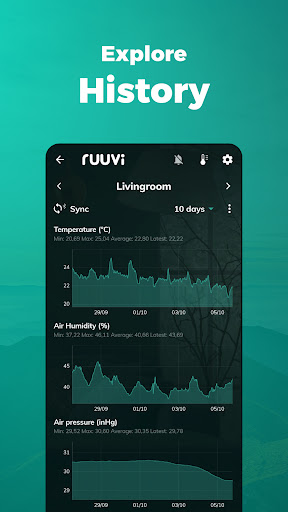
Ruuvi Station collects and visualises Ruuvi sensor data, such as temperature, relative air humidity, air pressure and movement from local Bluetooth Ruuvi sensors and Ruuvi Cloud. Additionally, Ruuvi Station allows you to manage your Ruuvi devices, set alerts, change background photos, and visualise the gathered sensor information through graphs.
How does it work?
Ruuvi sensors send tiny messages over Bluetooth, which can then be picked up by nearby mobile phones or specialised Ruuvi Gateway routers. Ruuvi Station mobile app enables you to collect and visualise this data on your mobile device. Ruuvi Gateway, on the other hand, routes the data over the internet not only to the mobile application but also to the browser application.
Ruuvi Gateway routes the sensor measurement data directly to the Ruuvi Cloud cloud service, which enables you to build a complete remote monitoring solution including remote alerts, sensor sharing and history in Ruuvi Cloud – all available within the Ruuvi Station app! Ruuvi Cloud users can view longer measurement history by using the browser application.
Use our customisable Ruuvi mobile widgets alongside the Ruuvi Station app when data is fetched from Ruuvi Cloud to view selected sensor data at a glance.
Above features are available to you if you are a Ruuvi Gateway owner or have received a shared sensor to your free Ruuvi Cloud account.
To use the app, get Ruuvi sensors from our official website: ruuvi.com
Cómo descargar Ruuvi Station APK
- Ingrese el nombre del paquete
com.ruuvi.stationen la página de inicio de APK Downloader. - Seleccione la arquitectura de su dispositivo (se recomienda ARM64 para dispositivos modernos).
- Haga clic en Descargar para obtener el archivo APK fusionado.
- Transfiera e instale el APK en su dispositivo Android.
- Manténgase actualizado: Visite APK Downloader regularmente para buscar y descargar las últimas versiones seguras de sus aplicaciones favoritas.
Seguridad y Verificación de Firma
Esta descarga de APK es 100% segura. Verificamos que la firma criptográfica del archivo coincida con las credenciales oficiales del desarrollador. No se inyectan modificaciones ni adware.