
Fuentes de descarga
Device Configuration
Guía de instalación de APKs divididas (Split APKs)
Algunas aplicaciones se distribuyen como APKs divididas (varios archivos .apk empaquetados juntos) para optimizar recursos. Los instaladores estándar de Android no pueden abrirlas.
Aplicaciones Relacionadas


Novedades
Fixes some known issues.
Acerca de esta aplicación
Key Improvements to Shelf:
Access Shelf from anywhere
You can open Shelf from the top right section of the status bar, from your home screen, or when any other app is open. This helps to open Shelf anytime and access your cards & widgets.
Personalisation with resizable cards
With the new Shelf, you can resize the cards to multiple sizes based on your choice and rearrange the cards within the grid. Currently Toolbox & Notes cards supports multiple sizes.
A smarter Scout search
Search for apps, shortcuts, files, contacts, settings & more. Users in India & North America can also search for music, movies, artists, food & more.
Cards available on Shelf:
1. Scout search bar: You can search by text or voice commands. Alternatively, you can also pull down the Shelf screen to open Scout.
2. Weather information: Get weather information for your live location
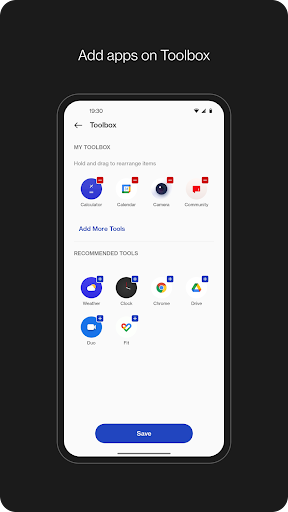
3. Toolbox: Add apps of your choice to Shelf to quickly open when you need them.
4. Step Counter or Health card: Count daily steps to keep track of your activity. When your device is connected to OnePlus Watch, you get additional data from Health app for workout, calories burnt, & activity period along with step count.
5. Data usage: Keep track of your mobile data usage per bill cycle. If the data limit is set, you can see the graph for data consumed & data left within the bill cycle.
6. Storage usage: Keep track of the storage used & left on your device.
7. Notes: Write quick notes on Shelf & set reminders. If OnePlus Notes app is installed, notes created on Shelf will also be available to access from OnePlus Notes app.
8. Sports: Get live scores, upcoming matches for your favorite teams in Cricket & Football. Sports card is available for users in India only.
9. Widgets: Add widgets from apps installed on device.
Cómo descargar OnePlus Shelf APK
- Ingrese el nombre del paquete
com.oneplus.opshelfen la página de inicio de APK Downloader. - Seleccione la arquitectura de su dispositivo (se recomienda ARM64 para dispositivos modernos).
- Haga clic en Descargar para obtener el archivo APK fusionado.
- Transfiera e instale el APK en su dispositivo Android.
- Manténgase actualizado: Visite APK Downloader regularmente para buscar y descargar las últimas versiones seguras de sus aplicaciones favoritas.
Seguridad y Verificación de Firma
Esta descarga de APK es 100% segura. Verificamos que la firma criptográfica del archivo coincida con las credenciales oficiales del desarrollador. No se inyectan modificaciones ni adware.