
Fuentes de descarga
Device Configuration
Guía de instalación de APKs divididas (Split APKs)
Algunas aplicaciones se distribuyen como APKs divididas (varios archivos .apk empaquetados juntos) para optimizar recursos. Los instaladores estándar de Android no pueden abrirlas.
Aplicaciones Relacionadas




Novedades
SSO Login – Corrected login signing out in sleep mode.
Push Notifications – Corrected scenarios where push notifications were not sending.
My Team Manage – Corrected Timesheet timeouts for teams with large numbers of employees.
Passcodes – Corrected passcodes being overridden by employee access groups.
Security upgrades
Acerca de esta aplicación
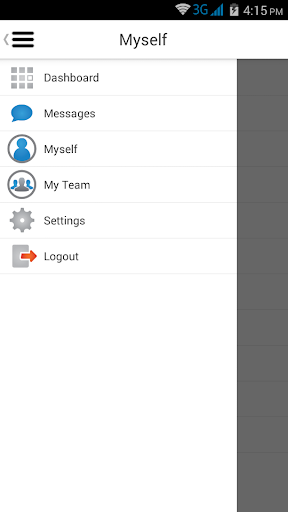
Designed with today’s demanding workforce in mind, NOVAtime’s Mobility Suite offers true functionality on the go. Whether you are a remote employee or a manager in the field supervising a team of employees, NOVAmobile offers the flexibility to provide critical workforce management tasks where needed and when needed for Android phone users. Powered by NOVAtime’s industry-leading SaaS solutions (NOVAtime 5000), the NOVAmobile application also incorporates many of the latest features that transcends Time and Attendance and becomes a strategic part of the daily management of your company from an HR, Payroll, and Accounting perspective. The simplified interface minimizes the learning curve and puts the power of data in your hands immediately!
Easy to configure and install, companies will be able to easily support the NOVAmobile application and secure access to only those authorized to use the application. General validation procedures also simplify deployment across large organizations and those supporting BYOD policies.
Key employee features:
- Clock in and out;
- Perform job/project transfers;
- Review work hours for the entire pay period (View Timesheet);
- Submit timesheet;
- View work schedules for the current and following weeks;
- View accrual balances;
- Request sick leave hours, vacation hours, etc.;
- View time-off requests.
Key supervisor features:
- Review and manage employee timesheets, including editing existing times, add and delete times;
- Approve employee timesheet;
- Team punch – build teams on the go and easily punch and transfer throughout the day;
- Review and approve time-off requests.
- Geo-Fencing auto-transfer and lockout capabilities.
Additional features:
- Enable offline punching. Use with Wi-Fi connections or when your phone cannot access the internet. Support punching in those remote areas and synchronize this data when in network!
- Enable Supervisor and Employee functionality roles within the single application install and let the user toggle seamlessly between the role needed at any given time
- Capture Geolocation data at the time of punch to help rack work locations (requires device user consent at install and enabling of location services)
Feel the Power of data on the go with NOVAtime’s mobility solutions!
Disclaimers: NOVAmobile is designed and built for Android device.
1. Use of this app requires data usage, subject to additional charges. Data charges will depend on the mobile phone service provider and actual usage patterns.
2. The NOVAmobile App collects and transmits (or allows the transmission of) geolocation information to the NOVAtime Workforce Management solution. The App accesses geolocation information for the sole purpose of recording the location of employee time punches. The App saves geolocation information within separate electronic timesheets for each employee. The information is provided with the sole intent of allowing supervisors/managers to verify locations from which employees report time punches. GPS data capture requires employee (app user) authorization. Location information will not be collected if GPS is not authorized.
3. The App transmits geolocation information only to the NOVAtime database of the client company with which an employee is associated. Geolocation information collected by the App is the property of the client and may be used and shared at the client’s discretion. NOVAtime is not responsible for the client’s release of geolocation information.
4. GPS location accuracy depends on physical location, signal strength, and the mobile phone service provider. NOVAtime cannot guarantee the capture of exact locations.
Cómo descargar NOVAmobile APK
- Ingrese el nombre del paquete
com.novatime.novamobileen la página de inicio de APK Downloader. - Seleccione la arquitectura de su dispositivo (se recomienda ARM64 para dispositivos modernos).
- Haga clic en Descargar para obtener el archivo APK fusionado.
- Transfiera e instale el APK en su dispositivo Android.
- Manténgase actualizado: Visite APK Downloader regularmente para buscar y descargar las últimas versiones seguras de sus aplicaciones favoritas.
Seguridad y Verificación de Firma
Esta descarga de APK es 100% segura. Verificamos que la firma criptográfica del archivo coincida con las credenciales oficiales del desarrollador. No se inyectan modificaciones ni adware.