
Fuentes de descarga
Device Configuration
Guía de instalación de APKs divididas (Split APKs)
Algunas aplicaciones se distribuyen como APKs divididas (varios archivos .apk empaquetados juntos) para optimizar recursos. Los instaladores estándar de Android no pueden abrirlas.
Aplicaciones Relacionadas



Novedades
We’ve made improvements to the overall experience and performance of the app. This update includes general enhancements and bug fixes to help everything run more smoothly.
Acerca de esta aplicación
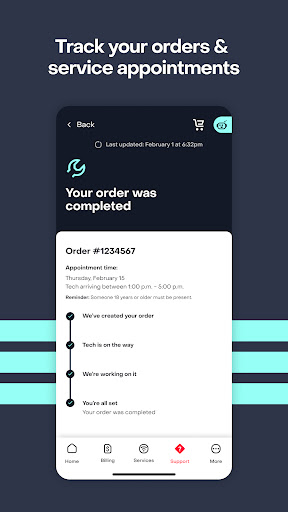
Get more control of your Frontier services and access discounts and offers from your favorite brands, personalized deals, and free goodies in the MyFrontier app. Change your service appointments to fit your schedule, make payments and account changes when it's convenient for you. Stay updated on our progress with order tracking, real-time installation updates and direct messaging with your service technician. Upgrade your plan with higher speeds and add-ons in your account anytime–no phone calls needed. Troubleshoot issues faster and get support when you need it with our virtual assistant and Help Center at your fingertips.
The app is a must-have for customers of:
- Frontier High-Speed Internet (Fiber Broadband, DSL, or Satellite)
- Frontier TV Services
- Frontier Voice Services
Do more with your account from your smartphone or tablet with these easy-to-use tools and features.
Services:
- Get personalized rewards, discounts and offers - Manage your Frontier services
- Upgrade your plan with add-ons and higher speeds
Billing and Payments:
- Make a one-time payment
- Set up Auto Pay
- Sign up for Paperless Billing
- View billing and payment history
- Compare current and past statements
Troubleshooting:
- Check for outages
- Track your orders and trouble tickets
- Reboot your gateway or TV Set-top box
- Get 24/7 help with our virtual assistant
Account Settings:
- Easily reset your password
- Control your notifications preferences
- Add contact information
Stay tuned for updates as we’re continuing to enhance the MyFrontier app to make it your essential Frontier self-service tool.
Cómo descargar MyFrontier APK
- Ingrese el nombre del paquete
com.frontier.selfserveen la página de inicio de APK Downloader. - Seleccione la arquitectura de su dispositivo (se recomienda ARM64 para dispositivos modernos).
- Haga clic en Descargar para obtener el archivo APK fusionado.
- Transfiera e instale el APK en su dispositivo Android.
- Manténgase actualizado: Visite APK Downloader regularmente para buscar y descargar las últimas versiones seguras de sus aplicaciones favoritas.
Seguridad y Verificación de Firma
Esta descarga de APK es 100% segura. Verificamos que la firma criptográfica del archivo coincida con las credenciales oficiales del desarrollador. No se inyectan modificaciones ni adware.