
Fuentes de descarga
Device Configuration
Guía de instalación de APKs divididas (Split APKs)
Algunas aplicaciones se distribuyen como APKs divididas (varios archivos .apk empaquetados juntos) para optimizar recursos. Los instaladores estándar de Android no pueden abrirlas.
Aplicaciones Relacionadas



Acerca de esta aplicación
Welcome to PDF Studio, the ultimate PDF management app designed to provide a comprehensive and powerful document editing experience. The app is equipped with features that cater to both casual users and professionals, ensuring seamless PDF handling for all your needs.
Key Features:
Scan: Create PDF documents directly from your device camera by scanning physical documents.
Images to PDF: Convert multiple images into a single PDF document with ease.
Merge: Combine multiple PDF files into one unified document.
Split: Divide a single PDF file into separate documents as needed.
Watermark: Add custom watermarks to protect and brand your PDF documents.
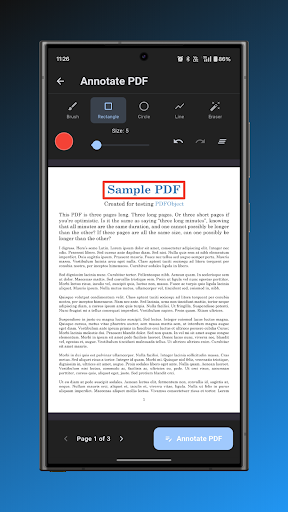
Annotate: Add notes, comments, and annotations to your PDF files.
Create: Build new PDF documents from scratch with full customization options.
Edit: Add text and images to existing PDF documents.
Sign: Add digital signatures to PDF files for authentication and approval.
Page Numbers: Insert page numbers throughout your PDF documents.
Lock: Secure your PDF files with password protection.
Unlock: Remove password protection from locked PDF files.
Page Size: Change the page size of your PDF documents to standard formats.
Crop: Crop PDF pages to remove unwanted margins or focus on specific content.
Compress: Reduce PDF file size without significant quality loss.
Rotate Pages: Rotate PDF pages to correct orientation.
Extract Pages: Extract specific pages from PDF documents.
Duplicate Pages: Create copies of pages within your PDF.
Remove Pages: Delete unwanted pages from PDF documents.
Rearrange Pages: Reorder pages in your PDF files.
Blank Pages: Insert blank pages into your PDF documents.
Flip Pages: Flip PDF pages horizontally or vertically.
Page Filter: Apply filters like black and white or grayscale to PDF pages.
PDF to MP3: Convert PDF text content to audio files.
PDF to Images: Convert PDF pages to image files.
PDF to TXT: Extract text content from PDF files.
Elevate your PDF management experience with PDF Studio, where every feature is crafted to support your document needs. Whether you're merging reports, signing contracts, or organizing documents, the app is your perfect PDF companion.
Developed by Anvaysoft
Programmer - Hrishi Suthar
Made with love in India
Cómo descargar PDF Studio(Pro) APK
- Ingrese el nombre del paquete
com.anvaysoft.pdfstudioproen la página de inicio de APK Downloader. - Seleccione la arquitectura de su dispositivo (se recomienda ARM64 para dispositivos modernos).
- Haga clic en Descargar para obtener el archivo APK fusionado.
- Transfiera e instale el APK en su dispositivo Android.
- Manténgase actualizado: Visite APK Downloader regularmente para buscar y descargar las últimas versiones seguras de sus aplicaciones favoritas.
Seguridad y Verificación de Firma
Esta descarga de APK es 100% segura. Verificamos que la firma criptográfica del archivo coincida con las credenciales oficiales del desarrollador. No se inyectan modificaciones ni adware.