
ডাউনलोड উৎস
Device Configuration
স্প্লিট এপিকে (Split APK) ইনস্টলেশন গাইড
কিছু অ্যাপস স্প্লিট এপিকে (একাধিক .apk ফাইল একসঙ্গে প্যাকেজ করা) হিসেবে বিতরণ করা হয়। সাধারণ অ্যান্ড্রয়েড ইনস্টলার এগুলো ইনস্টল করতে পারে না।
সম্পর্কিত অ্যাপ্লিকেশন


নতুন কী আছে
- Introduced Angular Gradients 🎨
- Rebuilt settings screen with modern UI components
- Improved overall stability
- Fixed UI issues in the upload screen
앱 সম্পর্কে
We created IPS with the idea that no icon pack can fit your home screen better than the one you create by yourself. With IPS you can create an icon pack from scratch or you can download and apply one of thousand uploaded every day by our community.
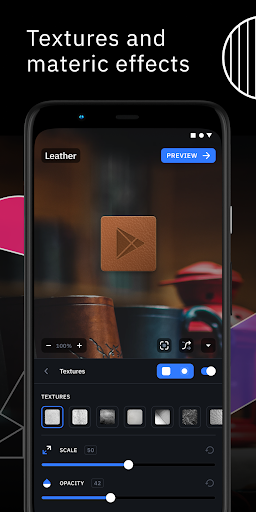
The advanced editor allows you to resize and move any element of your custom icon. Use special filters like lights, shadows, textures, and bezels and when you're happy with the result, apply the new icon pack to your custom launcher in just a few taps.
Icon Pack Studio is not only an icon pack maker, starting from version 2 you can import and tweak any icon pack installed on your device.
Icon packs created with Icon Pack Studio cover any app on your device No other icon pack downloaded from Play Store can do the same.
Icon Pack Studio is designed to work with Smart Launcher but works with almost any launcher
Tested launchers:
- Nova Launcher
- Action Launcher
- Lawnchar Launcher
- Hyperion Launcher
- Poco Launcher
- Miui Launcher
- ADW Launcher
- Microsoft Launcher
- Evie Launcher
- Total Launcher
- Niagara Launcher
- Square Home Launcher
- Apex Launcher
- Apex Launcher Classic
Unsupported launchers:
- Xperia Home Launcher
- Aviate
- Pixel Launcher
- AOSP Launcher
- Huawei Launcher
- Yahoo Japan Launcher
- +Home Launcher
- Samsung One UI Home
- LINE/Dodol Launcher
- Yandex Launcher
Many other launchers not in the list may be compatible with IPS.
কীভাবে Icon Pack Studio এপিকে ডাউনলোড করবেন
- APK Downloader হোমপেজে প্যাকেজ নাম
ginlemon.iconpackstudioলিখুন। - আপনার ডিভাইসের আর্কিটেকচার নির্বাচন করুন (আধুনিক ডিভাইসের জন্য ARM64 সুপারিশকৃত)।
- একত্রিত এপিকে ফাইল পেতে ডাউনলোড করুন এ ক্লিক করুন।
- আপনার অ্যান্ড্রয়েড ডিভাইসে এপিকে স্থানান্তর এবং ইনস্টল করুন।
- আপডেট থাকুন: আপনার প্রিয় অ্যাপগুলির সর্বশেষ নিরাপদ সংস্করণগুলি অনুসন্ধান এবং ডাউনলোড করতে নিয়মিত APK Downloader ভিজিট করুন।
নিরাপত্তা ও স্বাক্ষর যাচাইকরণ
এই APK ডাউনলোডটি ১০০% নিরাপদ। আমরা যাচাই করি যে ফাইলটির ক্রিপ্টোগ্রাফিক স্বাক্ষর অফিশিয়াল ডেভেলপারের ক্রেডেনশিয়ালের সাথে মেলে। কোনো মডিফিকেশন বা অ্যাডওয়্যার নেই।