
ডাউনलोड উৎস
Device Configuration
স্প্লিট এপিকে (Split APK) ইনস্টলেশন গাইড
কিছু অ্যাপস স্প্লিট এপিকে (একাধিক .apk ফাইল একসঙ্গে প্যাকেজ করা) হিসেবে বিতরণ করা হয়। সাধারণ অ্যান্ড্রয়েড ইনস্টলার এগুলো ইনস্টল করতে পারে না।
সম্পর্কিত অ্যাপ্লিকেশন



নতুন কী আছে
Bug Fixes
앱 সম্পর্কে
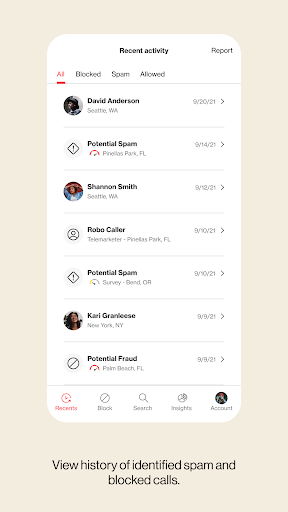
Your phone is your door to the world, and you shouldn't open it for just anyone. With Call Filter, you can screen incoming calls, auto-block spam and report any unwanted numbers. Or, upgrade to Call Filter Plus with Caller ID for added security. Put a name to the unknown numbers, make your own personal block list, and even assess the risk level of incoming calls. Enroll today and start answering with confidence.
Key Features:
• Get real-time alerts on your incoming call screen so you can better avoid spam calls
• Automatically send spam callers to voicemail with the spam filter
• Report a number as spam so you can help improve our algorithm
• Block calls from phone numbers similar to your own or from a specific NPA-NXX
• See each spam call’s level of risk so that you can learn more about the caller
• Manage other unwanted calls with a personal block list
• Search our spam database to see if a number has already been identified as spam
• Identify unknown numbers by name on the incoming call screen, call log and eligible messaging apps, even if the caller is not saved to your contacts
• Seamlessly update your contacts with newly identified numbers
Eligible customers get a 15-day trial of Call Filter Plus. Customers can choose to enroll in Call Filter to get the basics (spam detection, blocking and reporting) for free, or subscribe to Call Filter Plus for all that and more for $3.99 per month, per line. Accounts with 3 or more eligible lines can subscribe to Call Filter Plus (Multi-line) for $10.99/month by logging in to My Verizon. If you choose to enroll in Call Filter or Call Filter Plus, the spam filter will be automatically set to block high-risk spam callers, but you can change your block settings at any time. Data charges apply.
Verizon's Call Filter App requires a Verizon standard monthly account on an eligible device.
Please reference https://www.vzw.com/support/how-to-use-call-filter/ and https://www.vzw.com/support/call-filter-faqs/ for step-by-step instructions on how to use the app
কীভাবে Verizon Call Filter এপিকে ডাউনলোড করবেন
- APK Downloader হোমপেজে প্যাকেজ নাম
com.vzw.ecidলিখুন। - আপনার ডিভাইসের আর্কিটেকচার নির্বাচন করুন (আধুনিক ডিভাইসের জন্য ARM64 সুপারিশকৃত)।
- একত্রিত এপিকে ফাইল পেতে ডাউনলোড করুন এ ক্লিক করুন।
- আপনার অ্যান্ড্রয়েড ডিভাইসে এপিকে স্থানান্তর এবং ইনস্টল করুন।
- আপডেট থাকুন: আপনার প্রিয় অ্যাপগুলির সর্বশেষ নিরাপদ সংস্করণগুলি অনুসন্ধান এবং ডাউনলোড করতে নিয়মিত APK Downloader ভিজিট করুন।
নিরাপত্তা ও স্বাক্ষর যাচাইকরণ
এই APK ডাউনলোডটি ১০০% নিরাপদ। আমরা যাচাই করি যে ফাইলটির ক্রিপ্টোগ্রাফিক স্বাক্ষর অফিশিয়াল ডেভেলপারের ক্রেডেনশিয়ালের সাথে মেলে। কোনো মডিফিকেশন বা অ্যাডওয়্যার নেই।