
ডাউনलोड উৎস
Device Configuration
স্প্লিট এপিকে (Split APK) ইনস্টলেশন গাইড
কিছু অ্যাপস স্প্লিট এপিকে (একাধিক .apk ফাইল একসঙ্গে প্যাকেজ করা) হিসেবে বিতরণ করা হয়। সাধারণ অ্যান্ড্রয়েড ইনস্টলার এগুলো ইনস্টল করতে পারে না।
সম্পর্কিত অ্যাপ্লিকেশন




নতুন কী আছে
Performance improvements,
Billing library update.
앱 সম্পর্কে
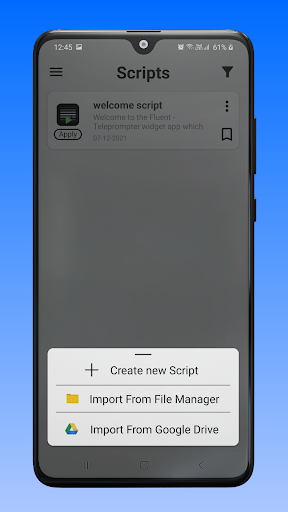
Fluent - Teleprompter widget help to read recently prepared text on your phone screen right during the recording video with any camera application.
We have developed a unique widget that works on all applications like Zoom, Team, Google Meet, Instagram live, Facebook live,YouTube live, etc.
Which provides a simple and convenient functionality, will help you perform at the very best during a live broadcast.
With Fluent Teleprompter widget you can:
- Change the size and position of the widget on the screen.
- Configure the script text size, colour and speed of its movement.
- You can change the size and position of the widget on the screen;
- At any time, play and pause the script scrolling and put it to the any position on then screen.
- Change the colour of the widget and adjust the opacity of its background.
- You can take backup your all scripts on your device and also Import script from Device and Google Drive.
How to use.
- Create script or import script.
- Change your desired settings on script like Text size, Background colour, Opacity, Text colour, Font style, Text scrolling speed and Text alignment.
- Press apply button for widget on script.
কীভাবে Fluent Teleprompter widget এপিকে ডাউনলোড করবেন
- APK Downloader হোমপেজে প্যাকেজ নাম
com.FluentAppলিখুন। - আপনার ডিভাইসের আর্কিটেকচার নির্বাচন করুন (আধুনিক ডিভাইসের জন্য ARM64 সুপারিশকৃত)।
- একত্রিত এপিকে ফাইল পেতে ডাউনলোড করুন এ ক্লিক করুন।
- আপনার অ্যান্ড্রয়েড ডিভাইসে এপিকে স্থানান্তর এবং ইনস্টল করুন।
- আপডেট থাকুন: আপনার প্রিয় অ্যাপগুলির সর্বশেষ নিরাপদ সংস্করণগুলি অনুসন্ধান এবং ডাউনলোড করতে নিয়মিত APK Downloader ভিজিট করুন।
নিরাপত্তা ও স্বাক্ষর যাচাইকরণ
এই APK ডাউনলোডটি ১০০% নিরাপদ। আমরা যাচাই করি যে ফাইলটির ক্রিপ্টোগ্রাফিক স্বাক্ষর অফিশিয়াল ডেভেলপারের ক্রেডেনশিয়ালের সাথে মেলে। কোনো মডিফিকেশন বা অ্যাডওয়্যার নেই।