
مصادر التحميل
Device Configuration
دليل تثبيت حزم APK المجزأة (Split APKs)
يتم توزيع بعض التطبيقات كحزم APK مجزأة (ملفات .apk متعددة معاً) لتحسين الموارد. ولا يمكن لمثبت أندرويد القياسي فتحها.
التطبيقات ذات صلة


ما الجديد
General improvements
حول هذا التطبيق
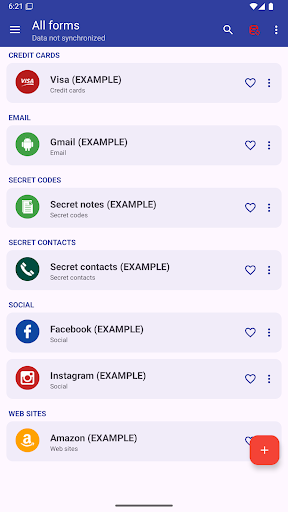
This app allows you to manage everything you need to keep secret: Password, Codes, Contacts, etc.
AES 256-bit encryption method was used, this is the most modern technology .
By automatic sync, you'll have all your passwords on all your Android devices and computer Windows, Linux and Mac.
MAIN FEATURES
➤ Access with fingerprint
➤ Sync with Google Drive and DropBox
➤ Desktop App (Windows, Mac & Linux)
➤ Password security analysis
➤ Password Generator
➤ Advanced search function
➤ Change app colors
➤ Automatic restore
➤ Auto lock
➤ Add your own custom icons
➤ Attach pictures and photographs, they will be encrypted and will be visible only within the application
➤ Add new categories
➤ Add new fields
➤ Creates PDF files with stored data to print on paper
➤ Material design
➤ Wear OS version
..and many more
AUTOMATIC SYNC:
Automatic synchronization lets you always have a backup of your passwords on a Cloud (
Also, with the same account, you can see your passwords in real time on all of your Android devices and Windows, Mac & Linux
ACCESS WITH FINGERPRINT:
Fingerprint access is an additional security method if you have a fingerprint and if your phone is compatible.
PASSWORD GENERATOR AND SECURITY ANALYSIS:
Within the app, a password generator is available, indicating the password security level. Also with the password generator you can check the password security you already have.
CUSTOM ICONS:
When you save a new password or other, you have the choice of over 110 icons, or easily insert your custom icon, which you can select from your phone's gallery or take a photo directly.
---------------------------------------------------------
Link to download the desktop version: https://www.2clab.it/passwordcloud
كيفية تنزيل APK Password Manager
- أدخل اسم الحزمة
password.cloudفي الصفحة الرئيسية لـ APK Downloader. - حدد بنية جهازك (يوصى بـ ARM64 للأجهزة الحديثة).
- انقر فوق تنزيل للحصول على ملف APK المدمج.
- قم بنقل وتثبيت APK على جهاز Android الخاص بك.
- ابقَ على اطلاع: قم بزيارة APK Downloader بانتظام للبحث عن أحدث الإصدارات الآمنة من تطبيقاتك المفضلة وتنزيلها.
الأمان والتحقق من التوقيع
تحميل ملف APK هذا آمن بنسبة 100٪. نحن نتحقق من أن التوقيع التشفيري للملف يطابق بيانات المطور الرسمية. لا توجد تعديلات أو إعلانات مدمجة.