
مصادر التحميل
Device Configuration
دليل تثبيت حزم APK المجزأة (Split APKs)
يتم توزيع بعض التطبيقات كحزم APK مجزأة (ملفات .apk متعددة معاً) لتحسين الموارد. ولا يمكن لمثبت أندرويد القياسي فتحها.
التطبيقات ذات صلة



ما الجديد
Bug Fixes
حول هذا التطبيق
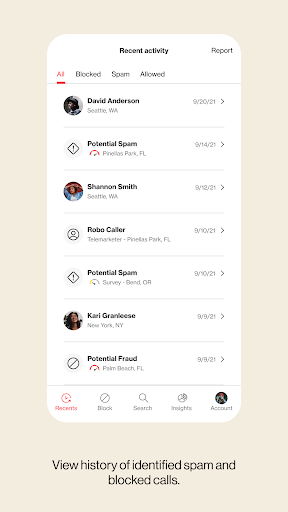
Your phone is your door to the world, and you shouldn't open it for just anyone. With Call Filter, you can screen incoming calls, auto-block spam and report any unwanted numbers. Or, upgrade to Call Filter Plus with Caller ID for added security. Put a name to the unknown numbers, make your own personal block list, and even assess the risk level of incoming calls. Enroll today and start answering with confidence.
Key Features:
• Get real-time alerts on your incoming call screen so you can better avoid spam calls
• Automatically send spam callers to voicemail with the spam filter
• Report a number as spam so you can help improve our algorithm
• Block calls from phone numbers similar to your own or from a specific NPA-NXX
• See each spam call’s level of risk so that you can learn more about the caller
• Manage other unwanted calls with a personal block list
• Search our spam database to see if a number has already been identified as spam
• Identify unknown numbers by name on the incoming call screen, call log and eligible messaging apps, even if the caller is not saved to your contacts
• Seamlessly update your contacts with newly identified numbers
Eligible customers get a 15-day trial of Call Filter Plus. Customers can choose to enroll in Call Filter to get the basics (spam detection, blocking and reporting) for free, or subscribe to Call Filter Plus for all that and more for $3.99 per month, per line. Accounts with 3 or more eligible lines can subscribe to Call Filter Plus (Multi-line) for $10.99/month by logging in to My Verizon. If you choose to enroll in Call Filter or Call Filter Plus, the spam filter will be automatically set to block high-risk spam callers, but you can change your block settings at any time. Data charges apply.
Verizon's Call Filter App requires a Verizon standard monthly account on an eligible device.
Please reference https://www.vzw.com/support/how-to-use-call-filter/ and https://www.vzw.com/support/call-filter-faqs/ for step-by-step instructions on how to use the app
كيفية تنزيل APK Verizon Call Filter
- أدخل اسم الحزمة
com.vzw.ecidفي الصفحة الرئيسية لـ APK Downloader. - حدد بنية جهازك (يوصى بـ ARM64 للأجهزة الحديثة).
- انقر فوق تنزيل للحصول على ملف APK المدمج.
- قم بنقل وتثبيت APK على جهاز Android الخاص بك.
- ابقَ على اطلاع: قم بزيارة APK Downloader بانتظام للبحث عن أحدث الإصدارات الآمنة من تطبيقاتك المفضلة وتنزيلها.
الأمان والتحقق من التوقيع
تحميل ملف APK هذا آمن بنسبة 100٪. نحن نتحقق من أن التوقيع التشفيري للملف يطابق بيانات المطور الرسمية. لا توجد تعديلات أو إعلانات مدمجة.