
مصادر التحميل
Device Configuration
دليل تثبيت حزم APK المجزأة (Split APKs)
يتم توزيع بعض التطبيقات كحزم APK مجزأة (ملفات .apk متعددة معاً) لتحسين الموارد. ولا يمكن لمثبت أندرويد القياسي فتحها.
التطبيقات ذات صلة




ما الجديد
- Get Emoji suggestions while typing 🔥
- Save WhatsApp status by swiping up 💾
- Save stickers to your favorites 📌
حول هذا التطبيق
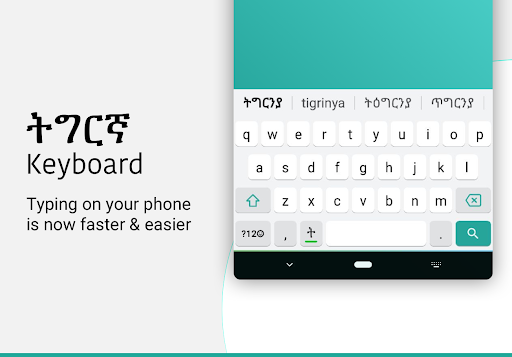
Tigrinya Keyboard lets you type in English characters which gets instantly converted to Tigrinya.
Typing with this Tigrinya keyboard is the fastest way to type - you don't need any other Tigrinya input tools. It works inside all applications on your phone - no more copy-paste! Supports 21+ colorful themes with easy settings, this is the trendiest way to type Tigrinya letters on Android, and the easiest Tigrinya typing keyboard!
Chat with your friends and family in your native language - use native Tigrinya text on Whatsapp, Facebook or any other app on your phone like a regular keyboard.
How to start Tigrinya typing using this Tigrinya Keyboard:
1. Open Tigrinya Keyboard from your apps after installing
2. Enable and choose Tigrinya Keyboard as your default keyboard.
3. Customize settings and choose from 21 amazing themes
4. Start typing Tigrinya language everywhere!
Start typing in English and choose Tigrinya word suggestions for what you're typing. Offline support coming soon. Works on Android phones and Android tablets. Simple to use with touch screen Tigrinya text typing from phonetic transliteration using this keyboard.
- Tigrinya keypad, Tigrinya layout and Tigrinya mobile keyboard in all your applications
- Easy swith to English or Tigrinya text as you need. Turn off Tigrinya when you don't need by using the language button.
- Emoji's are supported: hold on the 123 number button and you'll get a list of smileys. There are 3 pages from which you can choose what you need from the Tigrinya smiley keyboard..
- Color themes can be changed from the settings page. Look for Tigrinya keyboard in your apps to access this.
- Easily search and open apps installed on your phone and discover new apps relevant to you with our App Search feature.
No more typing with slow manual keyboards - this is the best Android Tigrinya Transliteration Keyboard that is free, fast, effortless and easy to use.
No personal information or credit card details are collected. We store anonymous statistics may be shared to improve your experience - share your suggestions at apps@clusterdev.com
Please leave great feedback - it helps us keep going!
كيفية تنزيل APK Tigrinya Keyboard
- أدخل اسم الحزمة
com.tigrinya.keyboard.for.androidفي الصفحة الرئيسية لـ APK Downloader. - حدد بنية جهازك (يوصى بـ ARM64 للأجهزة الحديثة).
- انقر فوق تنزيل للحصول على ملف APK المدمج.
- قم بنقل وتثبيت APK على جهاز Android الخاص بك.
- ابقَ على اطلاع: قم بزيارة APK Downloader بانتظام للبحث عن أحدث الإصدارات الآمنة من تطبيقاتك المفضلة وتنزيلها.
الأمان والتحقق من التوقيع
تحميل ملف APK هذا آمن بنسبة 100٪. نحن نتحقق من أن التوقيع التشفيري للملف يطابق بيانات المطور الرسمية. لا توجد تعديلات أو إعلانات مدمجة.