
مصادر التحميل
Device Configuration
دليل تثبيت حزم APK المجزأة (Split APKs)
يتم توزيع بعض التطبيقات كحزم APK مجزأة (ملفات .apk متعددة معاً) لتحسين الموارد. ولا يمكن لمثبت أندرويد القياسي فتحها.
التطبيقات ذات صلة



ما الجديد
* CSV and XLXS file exports now include all available measurements
* Improved sync according last updated information
* Fixed dew point in file exports
* Fixed crash in offset settings when extreme value was used
* Other minor bug fixes and improvements
* Removed those links that forwarded to the website and caused confusion
حول هذا التطبيق
Ruuvi Station is an easy-to-use application that allows you to monitor the measurement data of Ruuvi's sensors.
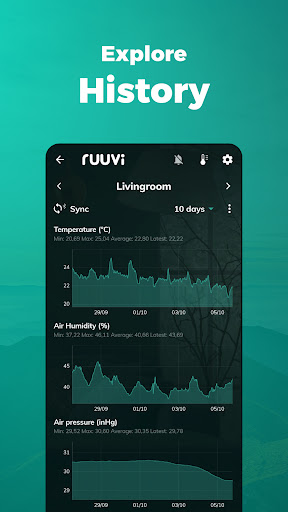
Ruuvi Station collects and visualises Ruuvi sensor data, such as temperature, relative air humidity, air pressure and movement from local Bluetooth Ruuvi sensors and Ruuvi Cloud. Additionally, Ruuvi Station allows you to manage your Ruuvi devices, set alerts, change background photos, and visualise the gathered sensor information through graphs.
How does it work?
Ruuvi sensors send tiny messages over Bluetooth, which can then be picked up by nearby mobile phones or specialised Ruuvi Gateway routers. Ruuvi Station mobile app enables you to collect and visualise this data on your mobile device. Ruuvi Gateway, on the other hand, routes the data over the internet not only to the mobile application but also to the browser application.
Ruuvi Gateway routes the sensor measurement data directly to the Ruuvi Cloud cloud service, which enables you to build a complete remote monitoring solution including remote alerts, sensor sharing and history in Ruuvi Cloud – all available within the Ruuvi Station app! Ruuvi Cloud users can view longer measurement history by using the browser application.
Use our customisable Ruuvi mobile widgets alongside the Ruuvi Station app when data is fetched from Ruuvi Cloud to view selected sensor data at a glance.
Above features are available to you if you are a Ruuvi Gateway owner or have received a shared sensor to your free Ruuvi Cloud account.
To use the app, get Ruuvi sensors from our official website: ruuvi.com
كيفية تنزيل APK Ruuvi Station
- أدخل اسم الحزمة
com.ruuvi.stationفي الصفحة الرئيسية لـ APK Downloader. - حدد بنية جهازك (يوصى بـ ARM64 للأجهزة الحديثة).
- انقر فوق تنزيل للحصول على ملف APK المدمج.
- قم بنقل وتثبيت APK على جهاز Android الخاص بك.
- ابقَ على اطلاع: قم بزيارة APK Downloader بانتظام للبحث عن أحدث الإصدارات الآمنة من تطبيقاتك المفضلة وتنزيلها.
الأمان والتحقق من التوقيع
تحميل ملف APK هذا آمن بنسبة 100٪. نحن نتحقق من أن التوقيع التشفيري للملف يطابق بيانات المطور الرسمية. لا توجد تعديلات أو إعلانات مدمجة.