
مصادر التحميل
Device Configuration
دليل تثبيت حزم APK المجزأة (Split APKs)
يتم توزيع بعض التطبيقات كحزم APK مجزأة (ملفات .apk متعددة معاً) لتحسين الموارد. ولا يمكن لمثبت أندرويد القياسي فتحها.
التطبيقات ذات صلة




ما الجديد
Patch release to provide you with an improved app experience.
حول هذا التطبيق
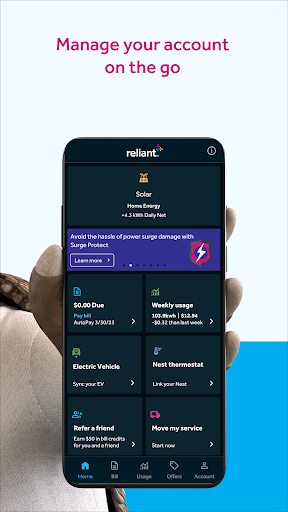
The improved Reliant app delivers powerful new features along with plenty of quick and easy ways to manage your Reliant account. Track electricity usage, receive alerts, pay your bill and sync your Google Nest thermostat and Goal Zero Yeti.
Keep your home comfortable
Connect and remotely adjust your Nest thermostat
Track electricity, solar and electric vehicle usage
Monitor electricity usage details by day, week, month or year. See your projected electricity bill and compare current and past usage.
Monitor your solar generation and consumption and see your Energy Efficiency score.
Sync your EV to schedule charging, see your gas savings and environmental impact.
Stay in the know
Sign up for Reliant Account Alerts to keep tabs on your electricity usage, bill due dates and even projected charges.*
Pay your bill your way
Use a stored credit card or bank account to quickly and securely pay your bill.
Manage prepaid funds
If you’re enrolled in a Reliant prepaid electricity plan, you can use the in-app payment calculator to budget your electricity usage.
Access account essentials
Review your plan details and manage account settings. Eligible customers can also renew, transfer or change their plan.
Get 24/7 help
Contact customer support, report an outage, find payment locations and view FAQs.
*Not available to customers enrolled in a Reliant prepaid electricity plan.
Visit reliant.com/app to learn more about the Reliant app. Please note that the Reliant app is only available to residential customers at this time.
Reliant is not affiliated with Google or the products and services they market. Google Nest and Google Nest thermostat are trademarks of Google LLC.
You can view our complete privacy policy at reliant.com/privacy. If you have any questions, we’re available 24/7 via online chat and at 1-866-222-7100.
Reliant is a registered service mark of Reliant Energy Retail Holdings, LLC. Reliant Energy Retail Services, LLC (PUCT Certificate #10007). © 2023 Reliant Energy Retail Holdings, LLC. All rights reserved.
Google Play and Android are trademarks of Google Inc.
كيفية تنزيل APK Reliant
- أدخل اسم الحزمة
com.reliant.appفي الصفحة الرئيسية لـ APK Downloader. - حدد بنية جهازك (يوصى بـ ARM64 للأجهزة الحديثة).
- انقر فوق تنزيل للحصول على ملف APK المدمج.
- قم بنقل وتثبيت APK على جهاز Android الخاص بك.
- ابقَ على اطلاع: قم بزيارة APK Downloader بانتظام للبحث عن أحدث الإصدارات الآمنة من تطبيقاتك المفضلة وتنزيلها.
الأمان والتحقق من التوقيع
تحميل ملف APK هذا آمن بنسبة 100٪. نحن نتحقق من أن التوقيع التشفيري للملف يطابق بيانات المطور الرسمية. لا توجد تعديلات أو إعلانات مدمجة.