
مصادر التحميل
Device Configuration
دليل تثبيت حزم APK المجزأة (Split APKs)
يتم توزيع بعض التطبيقات كحزم APK مجزأة (ملفات .apk متعددة معاً) لتحسين الموارد. ولا يمكن لمثبت أندرويد القياسي فتحها.
التطبيقات ذات صلة


ما الجديد
- Share and browse Virtual Controller layouts
- Bug fixes and performance improvements
حول هذا التطبيق
# What's New in 5.0.0:
## Updated for Kishi V3 series
• Added support for Kishi V3, Kishi V3 Pro, and Kishi V3 Pro XL
## PC Remote Play
• Directly stream games from your PC to your mobile device with Razer PC Remote Play
• Browse and launch your PC games directly from Razer Nexus
• Stream at your device's full resolution and max refresh rate
• Added support for full HDR streaming
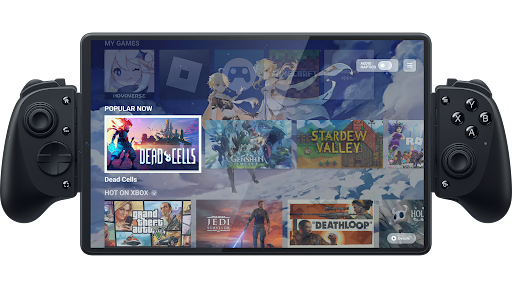
Bring the console experience to mobile with Kishi and Nexus. Browse a curated game catalog, play your games, customize your controller, and record and stream games Razer Nexus is compatible with the Razer Kishi V3 series, Razer Kishi Ultra, Razer Kishi V2 USB-C, and Razer Kishi V2 Welcome to the ultimate home for mobile gaming. Razer Nexus is a totally free, fully-integrated companion app for the latest Razer Kishi controllers that brings the full console experience to mobile. Browse a curated catalog of recommended games, play your installed games, customize your controller, and capture and livestream your gameplay - all from within Nexus. DISCOVER THOUSANDS OF COMPATIBLE GAMES
• Discover handpicked game recommendations across curated categories
• Optional video trailers make it easier to tell at a glance if a game looks fun
• Kishi is fully compatible with any game or service that supports controllers A CONSOLE GAMING EXPERIENCE ON MOBILE
• Press the Nexus button on your controller to immediately open Razer Nexus
• Launch your games and manage favorites
• Customizable UI with choice of background including new Dynamic Color and Game Background modes
• Capture pictures and videos of your gaming with a dedicated button or livestream your gameplay THE PERFECT COMPANION TO KISHI
• Customize Kishi settings, update firmware, and remap the multifunction buttons
• Specify custom Chroma colors and animation patterns
• Take screenshots and record video with the press of a button XBOX CLOUD GAMING
• Browse the complete catalog of Xbox Cloud games from within Nexus
• Includes information about how to play these games directly on your phone
• Xbox Game Pass Ultimate account required for most games
كيفية تنزيل APK Razer Nexus
- أدخل اسم الحزمة
com.razer.biancaفي الصفحة الرئيسية لـ APK Downloader. - حدد بنية جهازك (يوصى بـ ARM64 للأجهزة الحديثة).
- انقر فوق تنزيل للحصول على ملف APK المدمج.
- قم بنقل وتثبيت APK على جهاز Android الخاص بك.
- ابقَ على اطلاع: قم بزيارة APK Downloader بانتظام للبحث عن أحدث الإصدارات الآمنة من تطبيقاتك المفضلة وتنزيلها.
الأمان والتحقق من التوقيع
تحميل ملف APK هذا آمن بنسبة 100٪. نحن نتحقق من أن التوقيع التشفيري للملف يطابق بيانات المطور الرسمية. لا توجد تعديلات أو إعلانات مدمجة.