
مصادر التحميل
Device Configuration
دليل تثبيت حزم APK المجزأة (Split APKs)
يتم توزيع بعض التطبيقات كحزم APK مجزأة (ملفات .apk متعددة معاً) لتحسين الموارد. ولا يمكن لمثبت أندرويد القياسي فتحها.
التطبيقات ذات صلة


ما الجديد
Fixes some known issues.
حول هذا التطبيق
Key Improvements to Shelf:
Access Shelf from anywhere
You can open Shelf from the top right section of the status bar, from your home screen, or when any other app is open. This helps to open Shelf anytime and access your cards & widgets.
Personalisation with resizable cards
With the new Shelf, you can resize the cards to multiple sizes based on your choice and rearrange the cards within the grid. Currently Toolbox & Notes cards supports multiple sizes.
A smarter Scout search
Search for apps, shortcuts, files, contacts, settings & more. Users in India & North America can also search for music, movies, artists, food & more.
Cards available on Shelf:
1. Scout search bar: You can search by text or voice commands. Alternatively, you can also pull down the Shelf screen to open Scout.
2. Weather information: Get weather information for your live location
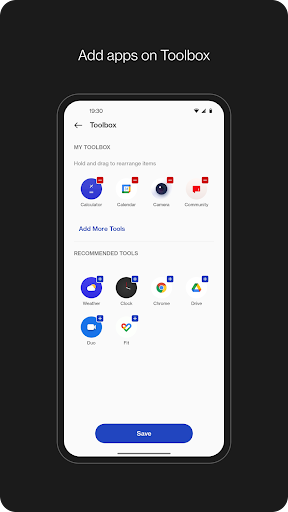
3. Toolbox: Add apps of your choice to Shelf to quickly open when you need them.
4. Step Counter or Health card: Count daily steps to keep track of your activity. When your device is connected to OnePlus Watch, you get additional data from Health app for workout, calories burnt, & activity period along with step count.
5. Data usage: Keep track of your mobile data usage per bill cycle. If the data limit is set, you can see the graph for data consumed & data left within the bill cycle.
6. Storage usage: Keep track of the storage used & left on your device.
7. Notes: Write quick notes on Shelf & set reminders. If OnePlus Notes app is installed, notes created on Shelf will also be available to access from OnePlus Notes app.
8. Sports: Get live scores, upcoming matches for your favorite teams in Cricket & Football. Sports card is available for users in India only.
9. Widgets: Add widgets from apps installed on device.
كيفية تنزيل APK OnePlus Shelf
- أدخل اسم الحزمة
com.oneplus.opshelfفي الصفحة الرئيسية لـ APK Downloader. - حدد بنية جهازك (يوصى بـ ARM64 للأجهزة الحديثة).
- انقر فوق تنزيل للحصول على ملف APK المدمج.
- قم بنقل وتثبيت APK على جهاز Android الخاص بك.
- ابقَ على اطلاع: قم بزيارة APK Downloader بانتظام للبحث عن أحدث الإصدارات الآمنة من تطبيقاتك المفضلة وتنزيلها.
الأمان والتحقق من التوقيع
تحميل ملف APK هذا آمن بنسبة 100٪. نحن نتحقق من أن التوقيع التشفيري للملف يطابق بيانات المطور الرسمية. لا توجد تعديلات أو إعلانات مدمجة.