Intune Company Portal

Intune Company Portal

Microsoft Corporation
★★★☆☆ 2.6 Business v5.0.7009.0 50,000,000+
Verified Safe & Direct
تحميل APK

مصادر التحميل

دليل تثبيت حزم APK المجزأة (Split APKs)

يتم توزيع بعض التطبيقات كحزم APK مجزأة (ملفات .apk متعددة معاً) لتحسين الموارد. ولا يمكن لمثبت أندرويد القياسي فتحها.

1. Download Split APKs Installer (SAI) from Google Play Store.
2. Download the app archive (.apks) using the download sources listed above.
3. Open SAI, click "Install APKs", choose the downloaded archive, and click Install.

التطبيقات ذات صلة

الإصدار
5.0.7009.0
التحميلات
50,000,000+
التحديث
Jun 16, 2026
المطور
Microsoft Corporation
الفئة
Business
التقييم للمحتوى
Everyone
الحزمة
com.microsoft.windowsintune.companyportal
ScreenshotScreenshotScreenshotScreenshotScreenshotScreenshot

حول هذا التطبيق

The Company Portal provides access to corporate apps and resources from almost any network. Your company must already subscribe to Microsoft Intune, and your IT admin must set up your account before you can use this app.

Features:
• Enroll to access corporate resources
• Browse and install company apps
• View and manage all your enrolled devices
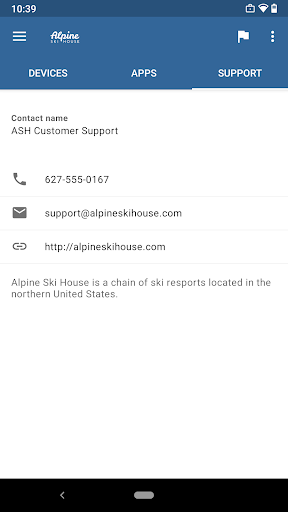
• View IT department contact information
• Change your work account password
• Unenroll or remotely wipe devices

Important: This app requires you to use your work account to enroll in Intune. Some functionality is unavailable in certain countries. If you have issues with this app or questions about its use (including your company’s privacy policy) contact your IT administrator and not Microsoft, your network operator, or your device manufacturer.

https://docs.microsoft.com/Intune/EndUser/using-your-android-device-with-intune

How to uninstall Company Portal:
Before you can uninstall Company Portal, you need to unenroll your device from Intune first. Here are the steps:

1) Follow these directions to unenroll: https://docs.microsoft.com/intune/enduser/unenroll-your-device-from-intune-android
2) Now, you can uninstall Company Portal like you would any other app

الأمان والتحقق من التوقيع

تحميل ملف APK هذا آمن بنسبة 100٪. نحن نتحقق من أن التوقيع التشفيري للملف يطابق بيانات المطور الرسمية. لا توجد تعديلات أو إعلانات مدمجة.

الهوية Basic Access
  • البحث عن حسابات على الجهاز
  • إضافة حسابات أو إزالتها
جهات الاتصال Basic Access
  • البحث عن حسابات على الجهاز
الموقع Basic Access
  • الموقع التقريبي (مستند إلى الشبكة)
  • الموقع الدقيق (مستند إلى نظام تحديد المواقع العالمي والشبكة)
الهاتف Basic Access
  • قراءة حالة الهاتف والهوية
الصور/الوسائط/الملفات Basic Access
  • قراءة محتوى وحدة تخزين USB
  • تعديل محتوى وحدة تخزين USB أو حذفها
مساحة التخزين Basic Access
  • قراءة محتوى وحدة تخزين USB
  • تعديل محتوى وحدة تخزين USB أو حذفها
الكاميرا Basic Access
  • التقاط صور وفيديوهات
معلومات اتصال Wi-Fi Basic Access
  • عرض اتصالات Wi-Fi
معرّف الجهاز ومعلومات عن المكالمات Basic Access
  • قراءة حالة الهاتف والهوية
غير ذلك Basic Access
  • عرض اتصالات الشبكات
  • إنشاء حسابات وتعيين كلمات مرور
  • تغيير اتصال الشبكة
  • التوصيل والفصل من Wi-Fi
  • إمكانية الدخول بالكامل إلى الشبكة
  • إغلاق التطبيقات الأخرى
  • التحكم في اتصال الحقل القريب
  • العمل عند بدء التشغيل
  • الظهور أمام التطبيقات الأخرى
  • استخدام الحسابات على الجهاز
  • منع الجهاز من الدخول في وضع السكون
  • التبديل بين تفعيل المزامنة وإيقافها
  • قراءة خصائص خدمة Google