
مصادر التحميل
Device Configuration
دليل تثبيت حزم APK المجزأة (Split APKs)
يتم توزيع بعض التطبيقات كحزم APK مجزأة (ملفات .apk متعددة معاً) لتحسين الموارد. ولا يمكن لمثبت أندرويد القياسي فتحها.
التطبيقات ذات صلة



ما الجديد
Welcome to 1.0
Say it rough. Send it right. Starting today.
حول هذا التطبيق
Voiskey is an AI voice keyboard for voice typing and smart dictation. It turns natural speech into ready-to-use text for everyday writing.
You don’t need to speak in perfect sentences. Start with the rough version. Pause, restart, or correct yourself as you speak. Voiskey helps turn rough spoken thoughts into clear, polished text for messages, emails, notes, and more.
Use Voiskey to write faster across:
Messages and DMs
Emails and work chats
Notes
AI prompts
Meeting follow-ups
Social posts
Multilingual writing
Why Voiskey feels different:
Think out loud
Speak naturally, even when your idea is not fully formed. Voiskey helps clean up fillers, restarts, grammar slips, and rough phrasing.
Adapts to where you write
Turn what you say into a clearer message, a polished email, or an organized note.
Personalize your vocabulary
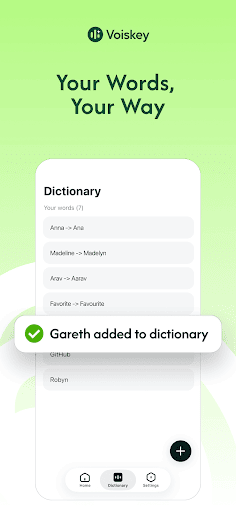
Add names, terms, and preferred spellings so voice typing better matches the way you write.
Works across daily workflows
Use your voice to create quick replies, follow-ups, reminders, class notes, and project updates with less typing.
Supports multilingual writing
Use your voice to write in supported languages across everyday writing scenarios.
Whisper when you need to
Voiskey can also help capture softer speech, including whispers, so you can use voice typing without disturbing people around you.
Faster than typing
Get your thoughts out before the keyboard slows you down.
Voiskey is built for anyone who writes every day and wants to turn natural speech into ready-to-use text.
Speak naturally. Write anywhere.
Privacy Policy:https://www.voiskey.ai/privacy
Terms of Use:https://www.voiskey.ai/terms
كيفية تنزيل APK Voiskey: AI Voice Typing
- أدخل اسم الحزمة
com.creativeapp.voiceinputفي الصفحة الرئيسية لـ APK Downloader. - حدد بنية جهازك (يوصى بـ ARM64 للأجهزة الحديثة).
- انقر فوق تنزيل للحصول على ملف APK المدمج.
- قم بنقل وتثبيت APK على جهاز Android الخاص بك.
- ابقَ على اطلاع: قم بزيارة APK Downloader بانتظام للبحث عن أحدث الإصدارات الآمنة من تطبيقاتك المفضلة وتنزيلها.
الأمان والتحقق من التوقيع
تحميل ملف APK هذا آمن بنسبة 100٪. نحن نتحقق من أن التوقيع التشفيري للملف يطابق بيانات المطور الرسمية. لا توجد تعديلات أو إعلانات مدمجة.