
مصادر التحميل
Device Configuration
دليل تثبيت حزم APK المجزأة (Split APKs)
يتم توزيع بعض التطبيقات كحزم APK مجزأة (ملفات .apk متعددة معاً) لتحسين الموارد. ولا يمكن لمثبت أندرويد القياسي فتحها.
التطبيقات ذات صلة




ما الجديد
Updated app connectivity and device compatibility.
حول هذا التطبيق
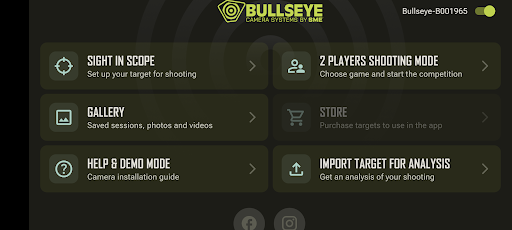
We are excited to introduce our updated Bullseye Target Manager app! Our updated app includes a revamped UI designed with ease of use and fluidity in mind. Never miss another shot with our easy-to-follow, step-by-step, sight-in instructions! Revisit your shots from the range with our improved gallery where you can store photos and videos from your previous sessions. Our all new in-app weather gives local weather updates specific to your location. All of this and much more! See the complete list of changes below.
• New UI allows for fast and easy navigation
• Compatible with Android 10
• Compatible with both phones and tablets
• Sight in your scope with our seamless step-by-step instructions
• The target setup is now easier than ever with our more intuitive design
• Two-player mode features a wide variety of games allowing you and a friend to compete for the best shot
• View saved photos and videos in the gallery
• All new in-app weather
• Built-in social media links allow you to share with your friends like never before
• Built-in demo mode and user guide allows anyone to effectively learn and use the Bullseye Target Manager App
كيفية تنزيل APK Bullseye Target Manager
- أدخل اسم الحزمة
com.bcs.managerفي الصفحة الرئيسية لـ APK Downloader. - حدد بنية جهازك (يوصى بـ ARM64 للأجهزة الحديثة).
- انقر فوق تنزيل للحصول على ملف APK المدمج.
- قم بنقل وتثبيت APK على جهاز Android الخاص بك.
- ابقَ على اطلاع: قم بزيارة APK Downloader بانتظام للبحث عن أحدث الإصدارات الآمنة من تطبيقاتك المفضلة وتنزيلها.
الأمان والتحقق من التوقيع
تحميل ملف APK هذا آمن بنسبة 100٪. نحن نتحقق من أن التوقيع التشفيري للملف يطابق بيانات المطور الرسمية. لا توجد تعديلات أو إعلانات مدمجة.