
مصادر التحميل
Device Configuration
دليل تثبيت حزم APK المجزأة (Split APKs)
يتم توزيع بعض التطبيقات كحزم APK مجزأة (ملفات .apk متعددة معاً) لتحسين الموارد. ولا يمكن لمثبت أندرويد القياسي فتحها.
التطبيقات ذات صلة


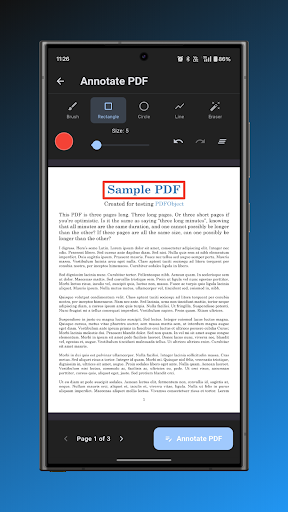

حول هذا التطبيق
Welcome to PDF Studio, the ultimate PDF management app designed to provide a comprehensive and powerful document editing experience. The app is equipped with features that cater to both casual users and professionals, ensuring seamless PDF handling for all your needs.
Key Features:
Scan: Create PDF documents directly from your device camera by scanning physical documents.
Images to PDF: Convert multiple images into a single PDF document with ease.
Merge: Combine multiple PDF files into one unified document.
Split: Divide a single PDF file into separate documents as needed.
Watermark: Add custom watermarks to protect and brand your PDF documents.
Annotate: Add notes, comments, and annotations to your PDF files.
Create: Build new PDF documents from scratch with full customization options.
Edit: Add text and images to existing PDF documents.
Sign: Add digital signatures to PDF files for authentication and approval.
Page Numbers: Insert page numbers throughout your PDF documents.
Lock: Secure your PDF files with password protection.
Unlock: Remove password protection from locked PDF files.
Page Size: Change the page size of your PDF documents to standard formats.
Crop: Crop PDF pages to remove unwanted margins or focus on specific content.
Compress: Reduce PDF file size without significant quality loss.
Rotate Pages: Rotate PDF pages to correct orientation.
Extract Pages: Extract specific pages from PDF documents.
Duplicate Pages: Create copies of pages within your PDF.
Remove Pages: Delete unwanted pages from PDF documents.
Rearrange Pages: Reorder pages in your PDF files.
Blank Pages: Insert blank pages into your PDF documents.
Flip Pages: Flip PDF pages horizontally or vertically.
Page Filter: Apply filters like black and white or grayscale to PDF pages.
PDF to MP3: Convert PDF text content to audio files.
PDF to Images: Convert PDF pages to image files.
PDF to TXT: Extract text content from PDF files.
Elevate your PDF management experience with PDF Studio, where every feature is crafted to support your document needs. Whether you're merging reports, signing contracts, or organizing documents, the app is your perfect PDF companion.
Developed by Anvaysoft
Programmer - Hrishi Suthar
Made with love in India
كيفية تنزيل APK PDF Studio(Pro)
- أدخل اسم الحزمة
com.anvaysoft.pdfstudioproفي الصفحة الرئيسية لـ APK Downloader. - حدد بنية جهازك (يوصى بـ ARM64 للأجهزة الحديثة).
- انقر فوق تنزيل للحصول على ملف APK المدمج.
- قم بنقل وتثبيت APK على جهاز Android الخاص بك.
- ابقَ على اطلاع: قم بزيارة APK Downloader بانتظام للبحث عن أحدث الإصدارات الآمنة من تطبيقاتك المفضلة وتنزيلها.
الأمان والتحقق من التوقيع
تحميل ملف APK هذا آمن بنسبة 100٪. نحن نتحقق من أن التوقيع التشفيري للملف يطابق بيانات المطور الرسمية. لا توجد تعديلات أو إعلانات مدمجة.