
Download Sources
Device Configuration
Split APKs Installation Guide
Some apps are distributed as Split APKs (multiple .apk files packaged together) to optimize resources. Standard Android installers cannot open them.
Related Applications

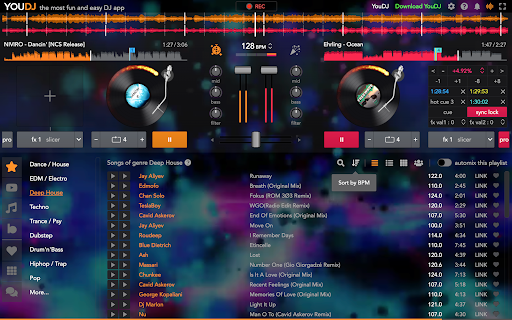


About this app
IMPORTANT : This app is designed for computers or tablets (big screen), not a mobile phone.
YouDJ is the most easy DJ software. Mix music like a pro DJ even if it is your first time! You don't need music either, YouDJ comes with great songs too. Also it is mostly free and with no ad!
YouDJ offers all must-have DJ tools :
- Super fun and easy-to-use virtual DJ turnables
- includes all must-have DJ tools you need to mix music
- tools : scratch, beatsync, mixer, loops, eq, effects, sampler…
- music included in the app with +3000 songs
- browse music by genre (house, dance...)
- automix your playlists
- video DJ player
- midi DJ controllers
- record your mixes...
Try it by yourself, it is free :)
Erik the YouDJ programmer
How to Download YouDJ Mixer for Chromebook APK
- Enter the package name
youdj.onlineon the APK Downloader homepage. - Select your device architecture (ARM64 recommended for modern devices).
- Click Download to get the merged APK file.
- Transfer and install the APK on your Android device.
- Keep Updated: Visit APK Downloader regularly to search for and download the latest secure versions of your favorite apps.