
Download Sources
Split APKs Installation Guide
Some apps are distributed as Split APKs (multiple .apk files packaged together) to optimize resources. Standard Android installers cannot open them.
Related Applications


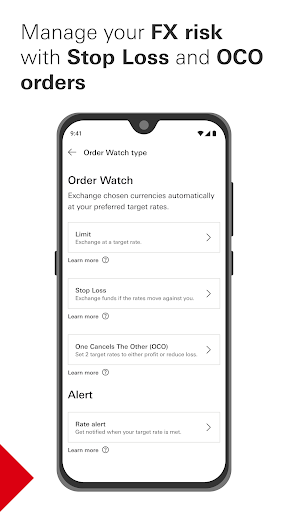


What's New
Set profit and loss thresholds with Stop Loss and OCO orders in FX Order Watch — manage your FX needs with more flexibility, all in one place
About this app
The HSBC Singapore app has been built with reliability at its heart. Designed specifically for our Singapore customers, you can now enjoy a secure and convenient mobile banking experience with:
• Online banking registration on mobile –use your mobile device to easily set up and register for online banking account. All you need is your Singpass app or your photo ID (NRIC/MyKad/passport) and selfie for verification.
• Digital secure key – generate a security code for online banking, quickly and securely without having to carry a physical security device.
• Instant account opening – open a bank account within minutes and enjoy instant online banking registration.
• Instant investment account opening -prefilled for eligible customers with few extra taps and instant decisioning to access Equities in Singapore, Hong Kong & the United States, Unit Trust, Bonds and Structured Products.
• Securities trading -access and experience securities trading anywhere, so you never miss opportunities.
• Insurance Purchase -easily purchase insurance for added peace of mind – get TravelSure and HomeSure directly through your mobile device.
• Validate your identity using your photo ID and selfie to securely set up your mobile banking device.
• Mobile wealth dashboard -review your investment performance with ease.
• Time Deposit -Make time deposit placements with competitive rates at a tenure of your choice at your fingertips.
• Global money transfers -manage your international payees, and perform timely transfers in a convenient and reliable way.
• PayNow – send money instantly and share payment receipts using just a mobile number, NRIC, Unique Entity Number and Virtual Payment Address.
• Scan to pay – simply scan the SGQR code to pay your friends for your meals or shopping or at participating merchants across Singapore.
• Transfers management - setup, view & delete a future-dated and recurring domestic transfers now available on the Mobile app.
• Payee management -one-stop solution for efficient payee management across your payments.
• Add new billers and make payments conveniently and securely anytime and anywhere.
• eStatements - view and download up to 12 months of both credit card and banking account eStatements.
• Card activation -instantly activate your new debit and credit cards and start using it.
• Lost /stolen cards -report lost or stolen debit and credit cards and request replacement cards.
• Block /unblock card -temporarily block and unblock your debit and credit cards.
• Balance transfer - Apply for credit cards balance transfer to convert your available credit limit into cash.
• Spend instalment – apply for Spend Instalment and repay your purchases via monthly instalments.
• Rewards programme – redeem credit card rewards that match your lifestyle.
• Virtual card – View and use your credit card details for online purchases.
• Chat with us -connect with us on the go whenever you need any assistance.
• Unit Trust-Invest now with our wide range of professionally managed unit trusts.
• Update personal details - Contact details & Address for seamless communication
Download HSBC Singapore app now to enjoy digital banking on the go!
Important:
This App is designed for use in Singapore. The products and services represented within this App are intended for Singapore customers.
This App is provided by HSBC Bank (Singapore) Limited.
HSBC Bank (Singapore) Limited is authorised and regulated in Singapore by the Monetary Authority of Singapore.
If you are outside of Singapore, we may not be authorised to offer or provide you with the products and services available through this App in the country or region you are located or reside in.
This App is not intended for distribution, download or use by any person in any jurisdiction, country or region where the distribution, download or use of this material is restricted and would not be permitted by law or regulation.
How to Download HSBC Singapore APK
- Enter the package name
sg.com.hsbc.hsbcsingaporeon the APK Downloader homepage. - Select your device architecture (ARM64 recommended for modern devices).
- Click Download to get the merged APK file.
- Transfer and install the APK on your Android device.
- Keep Updated: Visit APK Downloader regularly to search for and download the latest secure versions of your favorite apps.
Security & Signature Verification
This APK download is 100% safe. We verify that the cryptographic signature of the file matches the official developer credentials. No modifications or adware are injected.