
Download Sources
Device Configuration
Split APKs Installation Guide
Some apps are distributed as Split APKs (multiple .apk files packaged together) to optimize resources. Standard Android installers cannot open them.
Related Applications




What's New
You can use the Spotify for Creators app for audio and video podcasts, and no matter where your show is hosted. Our platform gives creators the features and flexibility to grow, earn, and manage their show:
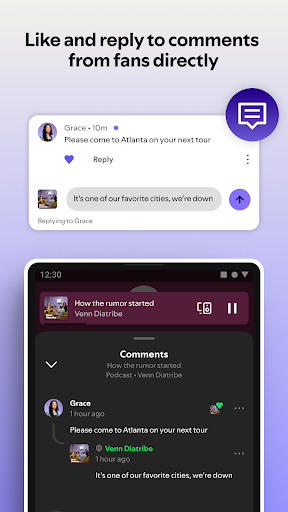
Like and reply to comments
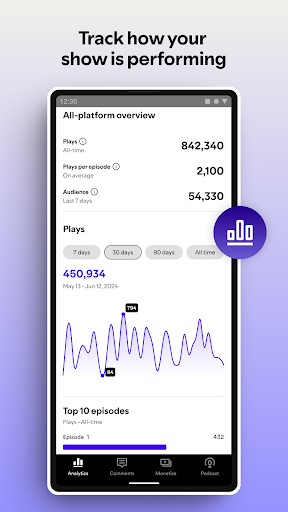
Track your latest episode’s performance
Manage your podcast RSS feed and ensure your podcast audio content is distributed to Spotify and all major listening platforms
Get key notifications to stay on top of your Spotify activity
Manage multiple shows in one place
About this app
The official app from Spotify that helps creators grow, monetize, and manage their podcast or video show. The Spotify for Creators app (formerly known as Spotify for Podcasters) allows you to host and distribute your podcast for free, use powerful tools to reach and engage new audiences, get paid for your content, and stand out to over 600 million Spotify users. Spotify for Creators is where podcasters and video creators can make meaningful connections with fans and monetize their content. Hosted somewhere else? You can still use our mobile app to manage your show on the go.
Fans come to Spotify to discover new podcasts. Tap into this audience by using Spotify for Creators to upload your episodes, connect with your fans, and check out your Spotify podcast analytics. With Spotify for Creators, podcast and video creators can:
Grow your community and connect with loyal fans
• Like and reply to your favorite fan comments
• Get real-time feedback by creating polls on your episodes, and more
• Grow your podcast with detailed insights about your show and your audience, and understand where they discover your show through impression analytics
Track and manage your show
• Get notifications to keep up with your show's activity, including fan interactions, trending episodes, when you hit the charts and other key milestones
• Track the performance of your latest episode and get detailed audience insights
• Manage multiple shows in one place, and easily switch between all of your shows from one account
Customize your show on Spotify
• No matter what kind of podcast or video content you’re creating, you’ll get powerful tools to help your show stand out on Spotify and beyond
• Draft, manage, and publish content seamlessly, regardless of where you are hosted
• Customize how your show and episodes appear on Spotify
Get free hosting and RSS distribution
• Host your podcast with Spotify for free
• Manage your podcast RSS feed and ensure your podcast audio content is distributed to all major listening platforms
Monetize your content (available for creators hosting their content on • Spotify for Creators in select markets)
For people wondering “how do you monetize a podcast?”, Spotify for Creators has flexible monetization options for audio and video creators, with subscriptions and the Spotify Partner Program (ads and premium video revenue)
Need help? We're here for you at https://support.spotify.com/us/creators/
You can also find us on…
Instagram: https://www.instagram.com/spotifyforcreators/
Facebook: https://www.facebook.com/spotifyforcreators
X: https://x.com/spotifycreator
How to Download Spotify for Creators APK
- Enter the package name
fm.anchor.androidon the APK Downloader homepage. - Select your device architecture (ARM64 recommended for modern devices).
- Click Download to get the merged APK file.
- Transfer and install the APK on your Android device.
- Keep Updated: Visit APK Downloader regularly to search for and download the latest secure versions of your favorite apps.
Security & Signature Verification
This APK download is 100% safe. We verify that the cryptographic signature of the file matches the official developer credentials. No modifications or adware are injected.