
Download Sources
Device Configuration
Split APKs Installation Guide
Some apps are distributed as Split APKs (multiple .apk files packaged together) to optimize resources. Standard Android installers cannot open them.
Related Applications




What's New
🐞 Bug Fixes & Performance Boost
About this app
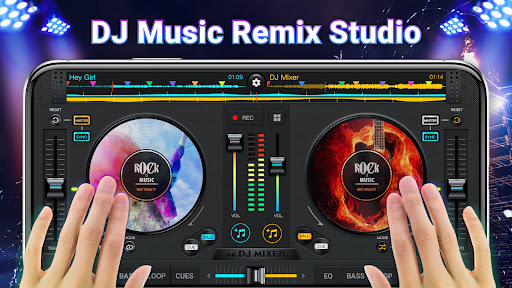
DJ Mixer Studio - DJ Music Mixer is a perfect virtual DJ mixer and music mixer with Equalizer, Bass Booster & Sound Effects to make music beat music remix songs & record mix music. With DJing Mixer - DJ Mixer Studio, effortlessly create and customize your music mixes using a variety of powerful mixing tools, effects, and loops. 🎧🎶
DJ Remix - DJ Music Mix is a powerful, intuitive app designed for both professional and beginner DJs to create seamless mixes. Use it as a free DJ music tool to create and remix songs exactly the way you want. 🎺🎸
DJ Music Mixer - DJ Mixer Studio is optimized for the latest mobile devices, offering smooth, seamless mixing on any platform. Effortlessly mix your favorite tracks, add effects, and enjoy a real DJ player with dual crossfaders. Explore a variety of loops and an intuitive sound editor for custom creations. Whether you're a pro or just starting out, our app has everything you need to craft incredible DJ mixes.
Looking for a top-tier virtual DJ and music mixer? Want to create the perfect playlist for your next party? This powerful DJ mixer is designed for creative minds and music lovers like you!💯💯
📀 Powerful DJ Mixer Studio & DJ Music Beat Maker
• Use a professional-grade mixer for flexible, dynamic mixing
• Real crossfader with 2 virtual turntables for seamless transitions
• Set up to 6 Hot Cues per deck, with loops from 1/64 to 128 beats
• Intuitive interface for quick access to all essential features
• Designed by professional DJs for optimal performance
🎛️ DJ Music Mixer & FX Sound Effects
• Built-in sound effects on music remix pads: 28 free sample packs (DJing, Gunshot, Boom, Clap, Boing, Scratch, etc.)
• Five-band Equalizer & Bass Boost for enhanced sound control
• Adjustable mix volume and pitch for precise customization
🎙 High-Quality DJ Music Remix Recorder
• HD recording of your mixes and scratch routines in .mp3 format
• Record your mixes via Microphone or Internal Audio (Android 10+)
• High-quality, uninterrupted DJ song recordings
🥁 Advanced DJ Mixer Studio & DJ Remix Audio Features:
• Full DJ mixer with built-in sound effects and music remix tools
• Access all your device’s music: Tracks, Artists, Albums, Folders
• Effortlessly add music to your playlist library for easy imports
• Instant sound effects at your fingertips with customizable buttons
• Wide audio spectrum for precise beat detection and sync
• Rotate the turntable to remix tracks, play forward or in reverse
• Simple, user-friendly equalizer for controlling sound and effects
• High-quality, professional-level DJ player for seamless mixing
• Automatic beat and tempo detection
DJ Mixer Studio - DJ Music Mix is the ultimate virtual DJ tool for mixing tracks and creating music with ease. Download DJ Music Mixer - DJ Remix and start remixing like a pro! Select your favorite genres and use the pads to craft beats and songs. DJ Maker lets you experiment, mix styles, and create stunning melodies while mastering your beat-making skills step by step. Enhance your music with DJ sound effects, fine-tune with equalizers, and more—bring your live DJ remix to life!❤️❤️
How to Download DJ Mixer Studio - DJ Music Mix APK
- Enter the package name
dj.mixeron the APK Downloader homepage. - Select your device architecture (ARM64 recommended for modern devices).
- Click Download to get the merged APK file.
- Transfer and install the APK on your Android device.
- Keep Updated: Visit APK Downloader regularly to search for and download the latest secure versions of your favorite apps.
Security & Signature Verification
This APK download is 100% safe. We verify that the cryptographic signature of the file matches the official developer credentials. No modifications or adware are injected.