
Download Sources
Device Configuration
Split APKs Installation Guide
Some apps are distributed as Split APKs (multiple .apk files packaged together) to optimize resources. Standard Android installers cannot open them.
Related Applications



What's New
What's New:
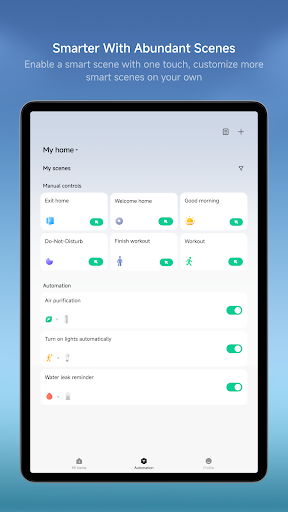
• Automation supports periodic execution of device actions, e.g., automatically turning on the electric blanket every 20 minutes.
About this app
A professional app to help you manage your intelligent devices.
Key Features:
Add new devices with a few easy steps
Control your device wherever you are
Get the status of your devices in real time
Share your devices with friends and family members
Set up and perform intelligent tasks
Key devices(availability may vary by model and region):
Camera: Live view, quick snapshots and video clips, plus easy access to recent events and history playback.
Printers: Printing-oriented templates and workflows, with built-in media selection and pre-checks to help meet printing requirements; supports richer creation flows (e.g., collage-style layouts and mixed media selection when needed) for a smoother end-to-end experience.
Lights:Support remote on/off control, brightness and color temperature adjustment, scene automation, and scheduling for a more comfortable smart lighting experience.
Air Conditioners: Support remote power control, temperature adjustment, mode switching, and smart automations to help users manage indoor comfort anytime, anywhere.
Fans:Support remote speed control, oscillation settings, scheduling, and integration with other smart devices for automated operation.
Switches: Support remote control of household lighting and electrical appliances, with automation capabilities that enable a more convenient smart home experience.
Smart Plugs & Power Strips: Support remote power control, scheduled operations, energy usage statistics (on supported devices), and smart automations to improve device management efficiency.
Notes
Xiaomi Home app obtained the Kitemark™ Certification for Secure Digital Applications: https://trust.mi.com/security
Device support may vary by region—please refer to the product manual or official website.
How to Download Xiaomi Home APK
- Enter the package name
com.xiaomi.smarthomeon the APK Downloader homepage. - Select your device architecture (ARM64 recommended for modern devices).
- Click Download to get the merged APK file.
- Transfer and install the APK on your Android device.
- Keep Updated: Visit APK Downloader regularly to search for and download the latest secure versions of your favorite apps.
Security & Signature Verification
This APK download is 100% safe. We verify that the cryptographic signature of the file matches the official developer credentials. No modifications or adware are injected.