
Download Sources
Device Configuration
Split APKs Installation Guide
Some apps are distributed as Split APKs (multiple .apk files packaged together) to optimize resources. Standard Android installers cannot open them.
Related Applications




What's New
Upgraded functionality and fixed some issues.
About this app
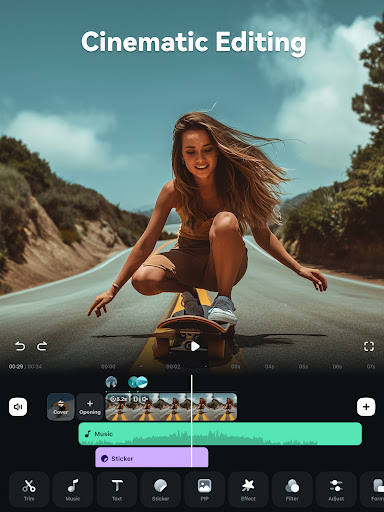
Shortcut to create a viral video? Filmora AI Video Editor (formerly FilmoraGo video editor) is an AI-based video editor & movie maker, featuring AI Auto Cut, AI Remover, Dynamic Captions, Text to Video, Text to Speech, etc! Best choice for creating videos, reels, vlogs and shorts!
🤖Powerful Brand New AI Features
🎞AI Auto Cut
· Seamlessly stitching highlight moments into cinematic tales!
🧽AI Remover
· Effortlessly erasing unwanted elements from videos.
📜Dynamic Captions
· Auto speech to text into dynamic word-by-word captions.
🎥Text to Video
· Generate videos with AI copywriting and subtitles, while maintaining visual quality and adherence to your prompt.
🗣AI Voice Cloning
· No more Voice-Over! Easily copy your voice and generate any speech you wish within customized emotions & in any language!
🎙️Text to Speech
· Transform text into professional voiceovers for your videos.
🎵AI Music & Sound Effects
· Generate royalty-free and professional-quality music and soundscapes for your videos!
✨AI Video Effects
· AI Show - Transform your photos into stunning, stylized photos or videos with just one click!
· Infinite Zoom - Dive into the world of endless visual possibilities.
✂️AI Smart Cutout
· You can remove background or chroma key and replace a sky in your videos.
· Customized Cutout - Swipe your finger, then intelligently identify the target area and cut anything out as you want!
· Cutout Plus - You can set strokes, overlay effects, and replace backgrounds for your keyed objects.
🥁Rhythm Master
· Automatic beat-matching can sync rhythm videos to the perfect beat for a seamless creation experience.
🎬User-friendly video editing for beginners
- Trim, split, duplicate, or merge video clips without losing quality.
- Add text, emoji, and exclusive stickers.
- Add music, sound effects & voice-overs. Royal-free built-in music library and sound effects.
- Extract music from the video and split audio to remove unwanted parts.
- Rotate or crop: Adjust the orientation or size.
- Adjust video ratios for Instagram/TikTok/Youtube posts.
- Adjust speed for fast or slow motion.
- Stunning templates help create videos in one click.
🏆Full-featured video editing for professional
- All-in-one Keyframe: More adjustment items support keyframes, combined with color and special effects, you can create more cool animations.
- Speed Curve: Speed control with customizable & pre-set curves for various themes.
- PIP (Picture in Picture): add multiple layers of video, images, stickers, special effects, text, etc.
- Masking: Cover and mix video clips, get different video effects.
- Smart tracking: Support stickers, text, and PIP intelligent tracking targets, whether you need to track faces, objects, or anything else.
🌟Filmora Pro Subscription
- With Filmora Pro video editor unlimited subscription, you can access all features and paid editing materials including stickers, filter packages, etc. Watermark and Logo Roll will be removed automatically.
- With“Android Pro”, you can access all Pro features and paid editing materials on Android.
- With“All Platform Pro”, you can access all Filmora Pro on Android, iOS, Mac, and Windows.
- You can turn off auto-renewal at any time through your Account Settings.
- Any unused portion of a free trial period, if offered, will be forfeited when the user purchases a subscription.
📧Contact Us
Service Email: mailer@service.wondershare.com
YouTube: https://www.youtube.com/c/FilmoraWondershare
Facebook: https://www.facebook.com/filmoravideoeditor
Instagram: https://www.instagram.com/filmora_editor
How to Download FilmoraHD - AI Video Creator APK
- Enter the package name
com.wondershare.filmoraon the APK Downloader homepage. - Select your device architecture (ARM64 recommended for modern devices).
- Click Download to get the merged APK file.
- Transfer and install the APK on your Android device.
- Keep Updated: Visit APK Downloader regularly to search for and download the latest secure versions of your favorite apps.
Security & Signature Verification
This APK download is 100% safe. We verify that the cryptographic signature of the file matches the official developer credentials. No modifications or adware are injected.