
Download Sources
Device Configuration
Split APKs Installation Guide
Some apps are distributed as Split APKs (multiple .apk files packaged together) to optimize resources. Standard Android installers cannot open them.
Related Applications




About this app
The Check-in by Wix app takes the stress out of event door management. Whether you’re planning a small club event or selling out a large venue, you can use the app to simply check-in guests on the go, take payments, manage staff, view stats in real-time and much more.
CHECK-IN & MANAGE GUESTS
Check guests in as they arrive at the event door either manually or by scanning a QR code. For areas with poor internet connection, you can use offline check in to keep track of guests entering your event. Manage your guest list from wherever you are by using a searchable guest list to keep track of everyone arriving and see who has or hasn’t paid for different ticket types. You can also reach out to individual guests to let them know if they need to complete a payment, reissue tickets to those who’ve misplaced them and add or remove guests from lists as needed.
SELL TICKETS ON THE SPOT WITH A MOBILE POS
Sell event tickets at the door or collect payments in person from guests who booked tickets online with a mobile point of sale (POS) system. Speed up event lineups and make secure, contactless sales on the spot and allow walk-ins to quickly buy their tickets right up until the last minute.
MANAGE STAFF
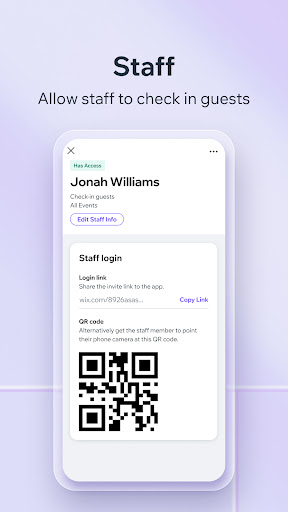
Adding staff members to all your events or specific ones, is a seamlessly intuitive process. Your team can effortlessly join by scanning a QR code or following a provided link.
EVENT STATS
Look at guest lists and see specific tickets types (e.g. early bird), plus see who’s been checked-in or not. You can also see stats about: total sales, net sales, tickets sold, number of page views for your event and then view each over certain periods of time.
Get stats on your guests order info including ticket number, ticket/s purchased, if they’ve paid and how much, when they paid and more.
How to Download Check-in by Wix APK
- Enter the package name
com.wix.eventson the APK Downloader homepage. - Select your device architecture (ARM64 recommended for modern devices).
- Click Download to get the merged APK file.
- Transfer and install the APK on your Android device.
- Keep Updated: Visit APK Downloader regularly to search for and download the latest secure versions of your favorite apps.
Security & Signature Verification
This APK download is 100% safe. We verify that the cryptographic signature of the file matches the official developer credentials. No modifications or adware are injected.