
Download Sources
Device Configuration
Split APKs Installation Guide
Some apps are distributed as Split APKs (multiple .apk files packaged together) to optimize resources. Standard Android installers cannot open them.
Related Applications




What's New
Bug Fixes and Stability Improvements to Downloads
About this app
DC UNIVERSE INFINITE is a fan-first, premium digital comic subscription service featuring a colossal library of DC comics!
Fans can dive in to over 27,000 comic books and graphic novels from DC, Vertigo, DC Black Label, and Milestone Media with our enhanced digital comic reader.
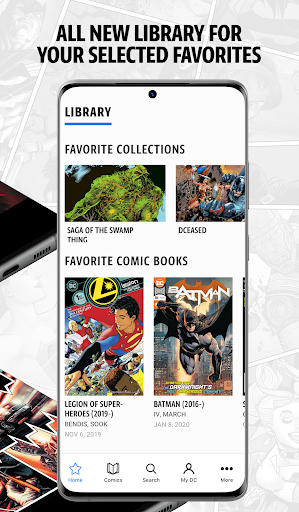
Follow your favorite heroes like Wonder Woman, Batman, Superman and Aquaman through curated collections and key storylines like Flashpoint and Dark Nights: Metal. Save collections, favorites and custom lists in our MyDC library and download issues for unlimited offline reading.
Join with a 7-day free trial. Free trial applies to the DC Universe Infinite ("DCUI") Monthly, Annual, or Ultra subscription plan, as selected by you. Free trial offer may be redeemed only once per person and cannot be combined with any other promotional or free trial offer for DCUI. After the free trial period ends, your free trial will convert into a paid subscription at the then-current rate, plus applicable taxes, unless you cancel before the conversion, and your subscription will automatically renew at the then-current rate plus applicable taxes on a recurring basis, unless you cancel before the renewal. Renewal charges will be applied to the payment method associated with your account, and you hereby authorize DC Comics or its designee to make such charge. Subscription fees are non-refundable. To cancel or prevent the automatic renewal of your subscription, log in to your DCUI account, go to Settings and click "Cancel Subscription" under the Subscription tab. If you cancel before the conversion or renewal you will still have access to your plan for the remainder of your free trial period or then-current billing period, as applicable. By clicking the "Start Free Trial Now" button, you agree to these terms and accept the Terms of Use: https://www.dcuniverseinfinite.com/terms.
Valid Ultra Annual paid subscription is required for the free collectible comic. Offer not available during the free trial period. Limit 1 collectible comic per account. Comic selected by DC. Content may vary. Expect your collectible comic 10-12 weeks after your mailing address is provided.
DC UNIVERSE INFINITE is not intended for children and is not available in all countries.
By downloading the app, you agree to the DC UNIVERSE INFINITE Terms of Use and Privacy Policy (New).
How to Download DC UNIVERSE INFINITE APK
- Enter the package name
com.wb.goog.dcuniverseon the APK Downloader homepage. - Select your device architecture (ARM64 recommended for modern devices).
- Click Download to get the merged APK file.
- Transfer and install the APK on your Android device.
- Keep Updated: Visit APK Downloader regularly to search for and download the latest secure versions of your favorite apps.
Security & Signature Verification
This APK download is 100% safe. We verify that the cryptographic signature of the file matches the official developer credentials. No modifications or adware are injected.