
Download Sources
Device Configuration
Split APKs Installation Guide
Some apps are distributed as Split APKs (multiple .apk files packaged together) to optimize resources. Standard Android installers cannot open them.
Related Applications




What's New
Fixed issues with login session handling, document review completion, and proposal calculations.
About this app
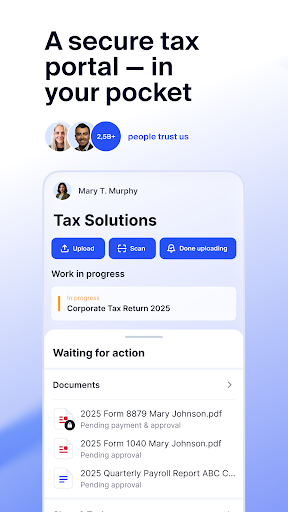
The TaxDome Client Portal is your accounting firm’s secure client portal, giving you one place to access requests, exchange documents, stay connected, securely sign documents, and complete payments with your accountant or tax professional from anywhere.
Use the app to see what’s waiting for you, submit information, review work, sign forms, and manage payments, all in one guided, secure experience.
What you can do using TaxDome as your secure accounting client portal
NOTE: Your accountant and/or bookkeeper must sign up for TaxDome before you can work with them through the TaxDome Client Portal
SUBMIT INFORMATION TO YOUR FIRM
Respond to requests from your accounting firm by scanning and uploading documents, scanning receipts, and completing organizers or questionnaires directly from your phone or tablet.
Business clients can also respond to bookkeeping requests and upload receipts on the go.
ACCEPT SERVICES & ENGAGEMENTS
Review and e-sign engagement letters or proposals when your firm begins new work or offers additional services.
REVIEW, APPROVE & SIGN WORK
When your firm completes your taxes or other work, review the documents, approve the work, sign required forms, and pay your invoice in one guided flow, all from the app.
STAY CONNECTED WITH YOUR FIRM
Message your accountant securely, share files within chat threads, track tasks that require your input, and receive push notifications when your firm needs action, so you never miss a deadline.
MANAGE INVOICES & PAYMENTS
View invoices sent by your firm, make one-time and recurring payments, and access your payment history.
MANAGE MULTIPLE ACCOUNTS
Easily switch between multiple accounts when needed. For example, couples or clients managing more than one business all within the same app.
BUILT FOR SECURITY AND EASE OF USE
Protect your information with secure login using Face ID, fingerprint authentication, or two-factor authentication (2FA), depending on your device. Your data stays protected while you interact with your firm from anywhere. Backed by accounting-specific SOC2 Type II certification and multiple internationally recognized compliance standards for data protection and secure best practices.
How to Download TaxDome Client Portal APK
- Enter the package name
com.taxdomeon the APK Downloader homepage. - Select your device architecture (ARM64 recommended for modern devices).
- Click Download to get the merged APK file.
- Transfer and install the APK on your Android device.
- Keep Updated: Visit APK Downloader regularly to search for and download the latest secure versions of your favorite apps.
Security & Signature Verification
This APK download is 100% safe. We verify that the cryptographic signature of the file matches the official developer credentials. No modifications or adware are injected.