
Download Sources
Device Configuration
Split APKs Installation Guide
Some apps are distributed as Split APKs (multiple .apk files packaged together) to optimize resources. Standard Android installers cannot open them.
Related Applications




What's New
What's new in 10.163?
• Drive Safe & Save® customers: see if your safe driving is improving with streaks and trends.
• Try the Accident Assistance demo.
• Get a seamless digital life insurance quote with more options.
• Have a Toyota? You can choose to share your vehicle data to help with a claim.
• Track Roadside Assistance requests with real-time updates.
• More feature enhancements and bug fixes to keep the app running at its best.
About this app
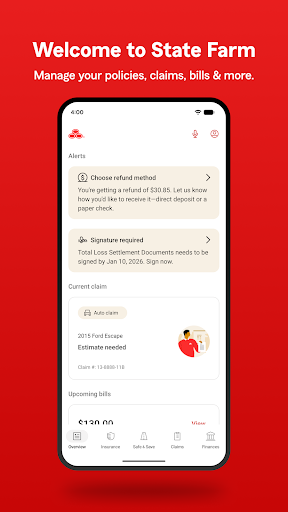
With the award-winning State Farm® app, you can manage your insurance and other products, request roadside assistance, file and track claims, and much more.
Drive Safe & Save® is on the move!
• We're moving all the great features of our safe driving discount program - Drive Safe & Save - into the State Farm app.
• If you're enrolled in the program, we'll email the first person listed on your auto policies when it's time to start using the State Farm app to access your Drive Safe & Save details.
• If you're already using the Drive Safe & Save app, you won't lose any of your info.
IMPORTANT: Drive Safe & Save terms of use, including precise location data collection and sharing, only apply to customers who have set up Drive Safe & Save and enable specific permissions on their mobile devices.
View and manage your insurance policies.
• Quickly pay your insurance bill - even with Google Pay.
• View your insurance card and add it to G-Pay.
• View your insurance policies and coverage details.
We're here to help when you have a claim.
• File a vehicle, property or vehicle glass claim.
• Track the status of your claim through every step.
• Get claim status notifications.
• Get roadside assistance with tire changes, dead batteries, stuck vehicles and more.
• Search for repair facilities.
More convenient features:
• Get personalized reminders and notifications when you log in.
• Log in with biometrics or a PIN.
• Need technical assistance? Send us a message on your time with our messaging feature.
• View details about your financial products.
• Help topics are available in the app when you need them.
• Learn about other products State Farm offers.
How to Download State Farm® APK
- Enter the package name
com.statefarm.pocketagenton the APK Downloader homepage. - Select your device architecture (ARM64 recommended for modern devices).
- Click Download to get the merged APK file.
- Transfer and install the APK on your Android device.
- Keep Updated: Visit APK Downloader regularly to search for and download the latest secure versions of your favorite apps.
Security & Signature Verification
This APK download is 100% safe. We verify that the cryptographic signature of the file matches the official developer credentials. No modifications or adware are injected.