
Download Sources
Device Configuration
Split APKs Installation Guide
Some apps are distributed as Split APKs (multiple .apk files packaged together) to optimize resources. Standard Android installers cannot open them.
Related Applications




What's New
We made some changes to make things run smoothly.
About this app
Ordering ahead is just a download away. Get the Starbucks® app for an easier way to enjoy your favorites and discover Rewards in every sip as a member.
ORDER SEAMLESSLY
• Order in the app when you’re on your way
• Customize and create your perfect drink
• Save your favorite stores
• View past orders & save custom drinks
• Save payment methods and scan to pay in stores
• Tip your barista for your delicious drink
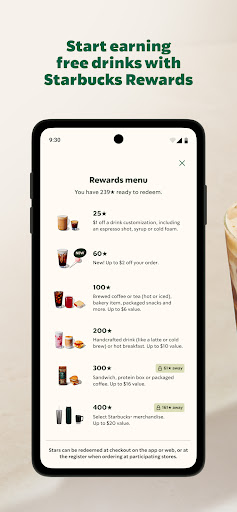
JOIN STARBUCKS® REWARDS
• Earn Stars to use on free food & drinks
• Start at Green status & level up to Gold or Reserve for exclusive benefits
• Enjoy a free drink on your birthday*, plus more time to redeem as you level up
• Try one free customization a month on Free Mod Mondays**
• Enjoy early access to new items
• Get Bonus Stars for digitally reloading your Starbucks Card (minimum $30)
• Explore games and offers just for you
SEND & SAVE eGIFTS
• Save all your Starbucks Cards in one spot
• Send eGifts via email, text, or messaging app
• Choose from unique designs for every occasion
FIND A STORE
• See stores near you
• Get directions and hours
• View store amenities like drive-thru & Wi-Fi
Must be a Starbucks Rewards member to enjoy exclusive member benefits and app features.
*Birthday Reward:
Green members: Redeemable on member’s birthday only, at participating stores.
Gold members: Redeemable for 7 days starting on member’s birthday, at participating stores.
Reserve members: Redeemable for 30 days starting on member’s birthday, at participating stores.
Free birthday drink must be standard menu size.
Excludes alcohol and multi-serve items. To qualify, you must have made at least one Star-earning transaction prior to your birthday each year.
**Mod Monday:
Redeemable at participating stores. Members will receive one free customization each month, up to $2 (pre-tax) each. Not valid for use with Rewards or other offers, discounts or promotions.
How to Download Starbucks APK
- Enter the package name
com.starbucks.mobilecardon the APK Downloader homepage. - Select your device architecture (ARM64 recommended for modern devices).
- Click Download to get the merged APK file.
- Transfer and install the APK on your Android device.
- Keep Updated: Visit APK Downloader regularly to search for and download the latest secure versions of your favorite apps.
Security & Signature Verification
This APK download is 100% safe. We verify that the cryptographic signature of the file matches the official developer credentials. No modifications or adware are injected.