
Download Sources
Split APKs Installation Guide
Some apps are distributed as Split APKs (multiple .apk files packaged together) to optimize resources. Standard Android installers cannot open them.
Related Applications




What's New
Usability improvements and minor bug fixes.
About this app
NOTE: This app cannot uninstall system apps
Free and easy to use Uninstaller for Android.
Manage your apps and save memory space on your phone or tablet.
You can delete multiple applications in one go and see more details about each of them.
It's a good habit (from time to time) to delete unused apps that occupy storage and consume other resources (battery and RAM memory).
Features:
• Uninstall apps easily by single click
• Support for remove apps individually or batch uninstall (long press support)
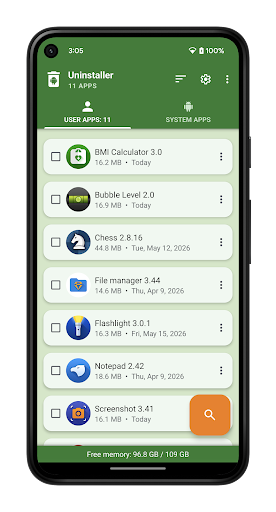
• Display application info: name, version, installation time and size
• Searching apps (also by voice search)
• Sorting by name, size and installation date (ascending and descending)
• Status bar (in notification area) for quick access, which can be switched off in settings
• Option menu with context actions for each app
• Details of the applications
• Search your apps in Google Play
• Create application shortcuts on your home screen
• Information about available memory space
• Usable and user-friendly interface
• Note: system apps can not be uninstalled using this app
About Us
• Visit SplendApps.com: http://splendapps.com/
• Our Privacy Policy: http://splendapps.com/privacy-policy
• Contact Us: http://splendapps.com/contact-us
Follow Us
• Facebook: https://www.facebook.com/SplendApps/
• Instagram: https://www.instagram.com/splendapps/
• Twitter: https://twitter.com/SplendApps
Security & Signature Verification
This APK download is 100% safe. We verify that the cryptographic signature of the file matches the official developer credentials. No modifications or adware are injected.