
Download Sources
Device Configuration
Split APKs Installation Guide
Some apps are distributed as Split APKs (multiple .apk files packaged together) to optimize resources. Standard Android installers cannot open them.
Related Applications





What's New
1. App Mode now allows you to customize website domains, not just apps! Connect any website domain to your desired VPN location!
About this app
SafeShell VPN provides unlimited, high-speed VPN access through a secure global network. Enjoy private and seamless browsing without speed limits, anytime, anywhere.
SafeShell revolutionizes VPN with a personalized connection experience! Our exclusive App Mode allows you to connect different apps to different regions simultaneously. Whether you're working, browsing, or staying in touch across borders — SafeShell gives you peace of mind. Compatible with iPhone, iPad, Mac, Apple TV, and Apple Vision Pro!
SafeShell VPN's brand new subtitle translation feature supports translation in 30+ languages, allowing you to watch your favourite content in a language that speaks to your heart. Original subtitles and translated subtitles are displayed side by side, allowing you to watch with ease!
Experience SafeShell now and discover a new realm of online freedom, compatible with iPhone, iPad, Mac, Apple TV, and Apple Vision Pro!
- App Mode
SafeShell's exclusive patented technology enables simultaneous apps to multiple regions, allowing a personalized, convenient experience
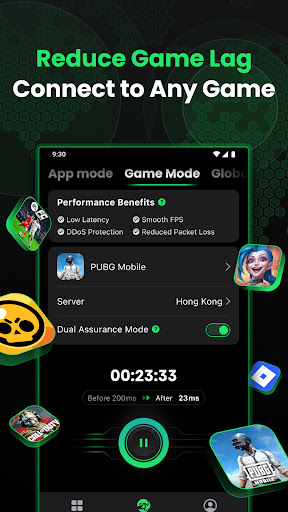
- Game Mode, built for Gaming
Using optimized routes to game servers for low latency and faster responses, stabilizing connections for smoother FPS, hiding your real IP for better DDoS protection, and improving network routing to reduce packet loss and in-game lag.
- Stay Secure with Hidden IP
Protect your personal information and online activities from hackers and surveillance, ensuring anonymity with hidden IP addresses and location protection.
- Public Wi-Fi Protection
Ensure the security of your data when using public Wi-Fi networks.
- Zero Logs Policy
Rest assured, knowing that no online activities or connection logs are stored for maximum privacy.
- Free Trial & Subscription
Try before you buy with a free trial and flexible subscription options.
If you’re enjoying a free trial, you will be charged on the last day of your free trial.
Your subscription will renew automatically at the end of each billing cycle, unless canceled at least 24 hours before the expiration date.
Easily manage your subscription and cancel anytime through your App Store account settings.
Purchasing a subscription will result in the forfeiture of any unused portion of a free trial period, if applicable.
You are welcome to read Subscription Terms here: https://www.safeshellvpn.com/license/Subscription-Terms.html
Privacy Policy: https://www.safeshellvpn.com/license/Privacy-Policy.html
User Agreement: https://www.safeshellvpn.com/license/User-Agreement.html
Terms of Use (EULA): https://www.apple.com/legal/internet-services/itunes/dev/stdeula/
Visit our official website for more detailed information: https://www.safeshellvpn.com/
For any inquiries or technical support, contact our dedicated team:
Email: support@safeshellvpn.com
Telegram: @safeshellvpn
How to Download SafeShell VPN: Fast & Secure APK
- Enter the package name
com.safeshellvpnon the APK Downloader homepage. - Select your device architecture (ARM64 recommended for modern devices).
- Click Download to get the merged APK file.
- Transfer and install the APK on your Android device.
- Keep Updated: Visit APK Downloader regularly to search for and download the latest secure versions of your favorite apps.
Security & Signature Verification
This APK download is 100% safe. We verify that the cryptographic signature of the file matches the official developer credentials. No modifications or adware are injected.