
Download Sources
Device Configuration
Split APKs Installation Guide
Some apps are distributed as Split APKs (multiple .apk files packaged together) to optimize resources. Standard Android installers cannot open them.
Related Applications



What's New
ReciMe is the #1 app to save recipes from Instagram, TikTok, Facebook, YouTube, Pinterest & more.
In this release, we made a number of improvements and bug fixes requested by our growing community of 10 million users.
ReciMe. Now you’re cooking.
About this app
The number 1 recipe organizer. ReciMe saves all your favorite recipes in one place, including Instagram, Facebook, TikTok, YouTube and Pinterest. Create grocery lists and meal plans. Calculate calories for every recipe. However you cook, ReciMe helps you do it, better.
FEATURES
- Save Recipes from Instagram, Facebook, TikTok, YouTube and Pinterest – Download recipes from social media sites. The ingredients and method steps are saved in an easy-to-read format.
- Upload recipes from anywhere – Save your favorite recipes from your existing apps like Paprika, Notes app, Google Docs, Notion, Evernote, and more! Or add your own recipes.
- Grocery Lists – Create smart grocery lists to shop faster! Sort ingredients by supermarket aisle or by recipe.
- Order Groceries – Turn your grocery list into a delivery! Order directly in-app and get ingredients to your door.
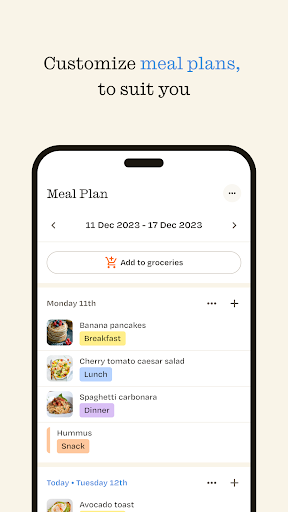
- Meal Plan for the Week – Categorize meals for breakfast, lunch, or dinner.
- Nutrition Information – Calculate calories, protein, carbs, and fats for any recipe.
- Create Cookbooks – Organize your recipes into cookbooks. Customize recipes by meal type (breakfast, lunch, dinner), cuisine, diet, and more!
- Cloud Sync – All recipes are saved on the cloud.
- Access Across Multiple Devices – iOS and iPad.
- Adjust Ingredients – Scale ingredients to your desired serving size.
- Convert Measurements – Change recipe measurements between standard and metric.
- Cook with Ease – Keep your phone screen unlocked while you cook. Follow recipes step-by-step so you can focus in the kitchen.
- Share – Share recipes with your friends and family. Or send via email, SMS, WhatsApp, Messenger, or AirDrop.
HOW DOES IT WORK?
ReciMe includes both a free version and a subscription version with premium features.
The premium version allows you to:
1. Download unlimited recipes from social media, and
2. Upload unlimited images of recipes to our smart importer
3. Calculate nutrition for every recipe
You can start a 7-day free trial to access these premium features. Unless you cancel at least 24 hours before the end of the free trial, you will be automatically charged the price indicated on the payment screen for your chosen subscription period. The ReciMe Premium subscription renews automatically at the end of each period (each month or year) until you cancel. Canceling your subscription means the automatic renewal will be disabled. However, you will still have access to all your subscription features for the remaining time of your then-current period. Note that deleting the app does not cancel your subscriptions.
Terms of Use: https://www.recime.app/terms-and-conditions
Privacy Policy: https://www.recime.app/privacy-policy
Have an idea to make your cooking experience with ReciMe better? Please reach out to us at https://recime.app/help
How to Download ReciMe: Recipes & Meal Planner APK
- Enter the package name
com.recime.appon the APK Downloader homepage. - Select your device architecture (ARM64 recommended for modern devices).
- Click Download to get the merged APK file.
- Transfer and install the APK on your Android device.
- Keep Updated: Visit APK Downloader regularly to search for and download the latest secure versions of your favorite apps.
Security & Signature Verification
This APK download is 100% safe. We verify that the cryptographic signature of the file matches the official developer credentials. No modifications or adware are injected.