
Download Sources
Device Configuration
Split APKs Installation Guide
Some apps are distributed as Split APKs (multiple .apk files packaged together) to optimize resources. Standard Android installers cannot open them.
Related Applications



What's New
Faster access to help and provider calling in Optum Assistant
Performance and reliability improvements
Bug fixes
About this app
The Optum app makes it easier than ever to manage your health care, get personalized support, and access all your eligible benefits in one place. It’s simple and secure.
Personalized for you
Optum knows that no two people are alike. That you and your health goals are unique. That’s why the Optum app is designed to be your go-to resource for staying on track with your individual health needs.
• Convenient scheduling: Find the providers you’re looking for, from primary care physicians (PCPs) to specialists. Depending on your eligibility, you may see provider availability and make and manage appointments to get the care you need.
• At your fingertips: Enjoy easy access to all your health information, important updates, and eligible benefits and programs, right from your home screen.
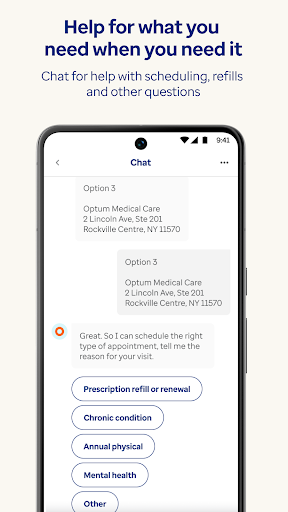
• Help when you need it: Message, chat or call nurses and other caring professionals who can help you navigate your health care needs and questions.
• Secure access: Feel confident knowing that the Optum app stores all your personal health data safely on your device.
Easy access to your eligible benefits
Optum offers a variety of benefits and services, designed for what you need. You may have access to:
Guided support:
• A dedicated team of Care Guides, nurses, wellness coaches and specialists who can provide tailored assistance and clear, compassionate answers to your questions.
• Timely help via chat or phone for finding a doctor, coordinating care, saving on prescriptions and navigating claims.
• Expert guidance and personalized recommendations to help you maximize your benefits, manage your health and achieve your individual goals.
Seamless health management:
• Comprehensive care enabling you to easily access your electronic medical records, see test results, make and manage appointments and handle prescriptions from your device.
• Secure messaging with your care team for help with scheduling, test results, refills and other health-related questions.
The Optum app connects all the dots in your individual health care journey, providing you with the information you need when you need it. Enjoy peace of mind knowing that Optum is by your side, guiding you to the right care. Download the app today and take control of your health. This experience is provided at no additional cost as part of your health benefits or care you receive.
This service should not be used for emergency or urgent care needs. In an emergency, call 911 or go to the nearest emergency room. The information provided through this service is for informational purposes only. The nurses cannot diagnose problems or recommend specific treatment and are not a substitute for your doctor’s care. Please discuss with your doctor how the information provided may be right for you. Your health information is kept confidential in accordance with the law. The service is not an insurance program and may be discontinued at any time.
© 2024 Optum, Inc. All rights reserved. Optum® is a registered trademark of Optum, Inc. in the U.S. and other jurisdictions. All other brand or product names are trademarks or registered marks of the property of their respective owners. Optum is an equal opportunity employer.
How to Download Optum APK
- Enter the package name
com.optum.mobile.optumon the APK Downloader homepage. - Select your device architecture (ARM64 recommended for modern devices).
- Click Download to get the merged APK file.
- Transfer and install the APK on your Android device.
- Keep Updated: Visit APK Downloader regularly to search for and download the latest secure versions of your favorite apps.
Security & Signature Verification
This APK download is 100% safe. We verify that the cryptographic signature of the file matches the official developer credentials. No modifications or adware are injected.