Download Sources
Device Configuration
Split APKs Installation Guide
Some apps are distributed as Split APKs (multiple .apk files packaged together) to optimize resources. Standard Android installers cannot open them.
Related Applications


What's New
v4.9
1. Fixed 16KB memory related issue
2. Optimized ANR issues
3. Fixed crash bugs
About this app
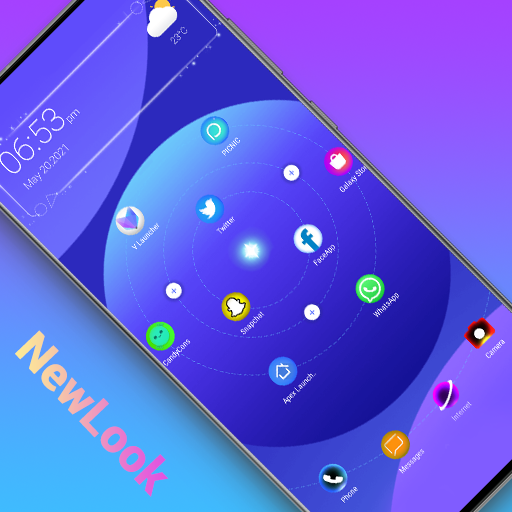
Newlook Launcher is a new launcher with galaxy and horoscope icon layout, star map shape, it is unusual and cool; Newlook Launcher will give you a fresh launcher experience, just get and try!
🌟🌟🌟🌟🌟Cool features:
+ Cool galaxy planisphere star map icons layout, unlike normal launcher
+ 15+ cool launcher desktop live effects:wave, flowers, feather, bubble, etc. very cool
+ Newlook Launcher has 200+ themes
+ Newlook Launcher support third party icon pack
+ Newlook Launcher support 3D parallax wallpaper
+ Newlook Launcher support 30+ icon shape: square, circle, teardrop, hive, star...
+ Handy all apps drawer: A-Z quick bar and search bar in launcher drawer, very handy to find apps
+ Gestures support: swipe up/down, pinch in/out, two fingers gesture
+ Config launcher icon grid, icon size
+ Cool finger animation in laucnher desktop
+ Support hide apps and lock apps
+ Support notification badge in launcher desktop
+ Many transition effects for desktop: cube in/out, wave, cross...
+ Lock desktop option
+ Icon label color customization
+ Weather widget show in launcher desktop
+ Config launcher drawer background
+ 3 drawer mode: horizontal mode, vertical mode, vertical with category
❤️Just try this Newlook Launcher, it will give your unusual and cool launcher experience.
Your comments are welcome, hope you will like Newlook Launcher, thanks
How to Download Newlook Launcher - Galaxy Star APK
- Enter the package name
com.newlook.launcheron the APK Downloader homepage. - Select your device architecture (ARM64 recommended for modern devices).
- Click Download to get the merged APK file.
- Transfer and install the APK on your Android device.
- Keep Updated: Visit APK Downloader regularly to search for and download the latest secure versions of your favorite apps.
Security & Signature Verification
This APK download is 100% safe. We verify that the cryptographic signature of the file matches the official developer credentials. No modifications or adware are injected.