
Download Sources
Device Configuration
Split APKs Installation Guide
Some apps are distributed as Split APKs (multiple .apk files packaged together) to optimize resources. Standard Android installers cannot open them.
Related Applications


About this app
Mevo allows anyone to live stream with ease. Our dedicated Android App allows content creators to control their Mevo cameras and stream in stunning 1080p HD to multiple streaming platforms like YouTube, Twitch and many more.
Control your Mevo
Using the Mevo Camera App, you can control every feature of your Mevo camera.
Instantly Stream to Your Favorite Platforms
With a few taps, you can stream instantly to popular streaming platforms like YouTube, Twitch and many more. *Subscribe to Mevo Pro to multistream.
Gesture Controls
Produce dynamic and compelling content by tapping to cut, pinching to zoom, and swiping to pan.
Facial Recognition and Autopilot
Enable autopilot and the built-in AI will track faces and make live edits for you.
Add Graphics
Add custom graphics including lower thirds, corner bugs, and full screen images and video to elevate the look of your stream
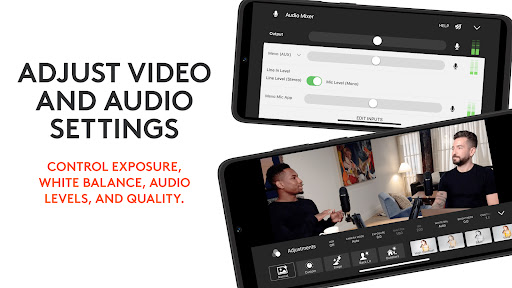
Adjust Video and Audio Settings
Control exposure, white balance, audio levels and quality.
Versatile Streaming Setups
Mevo integrates seamlessly into any setup with Webcam Mode, RTMP and NDI|HX compatibility**.
Premium Features
Get more Mevo with Mevo Pro subscription.
Compatible with, Mevo Core, Mevo Start, Mevo Plus and First Generation Mevo
ADDITIONAL SUPPORT
Visit help.mevo.com
FOOTNOTES
*Requires Mevo Pro Subscription
** Streaming via NDI is only available with the Mevo Start
How to Download Logitech Mevo APK
- Enter the package name
com.livestream.mevoon the APK Downloader homepage. - Select your device architecture (ARM64 recommended for modern devices).
- Click Download to get the merged APK file.
- Transfer and install the APK on your Android device.
- Keep Updated: Visit APK Downloader regularly to search for and download the latest secure versions of your favorite apps.
Security & Signature Verification
This APK download is 100% safe. We verify that the cryptographic signature of the file matches the official developer credentials. No modifications or adware are injected.