
Download Sources
Device Configuration
Split APKs Installation Guide
Some apps are distributed as Split APKs (multiple .apk files packaged together) to optimize resources. Standard Android installers cannot open them.
Related Applications



What's New
Bug Fix and Performance Improvement
About this app
• Want to get the best out of your solar panels or see where the sun is at any time? Whether you're setting up solar panels, checking how much energy you can produce, or just curious about the sun's path, this app gives you the easy-to-understand information and tools you need.
🌍 Key Features:
1. Sun AR:
• AR View – See the sun’s position using camera.
• View Sun’s Position in real-time sun tracking in Augmented Reality (AR). Point your phone's camera at the sky to view the sun's current path, helping you plan for optimal lighting and timing & set Custom Time Adjustments, Check sunlight conditions for any date.
2. Sun Compass:
• Track the sun’s direction on a map using your time and location & See sun position in degrees and follow its movement throughout the day.
3. Sun Timer:
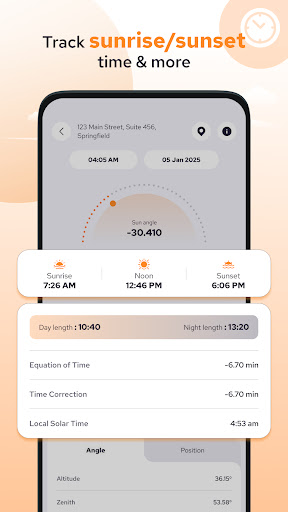
• Helps you Track the sun's position, sunrise, sunset, and day length specific to your location.
• Get sunrise, sunset, and day length info.
• View sun angles—altitude, azimuth, zenith—and adjust the timeline to explore changes.
• Optimize Solar Efficiency: Use air mass, equation of time, and time correction for precise solar panel alignment.
• Solar Data: Get latitude, longitude, local solar time, and meridian information for your location.
4. Solar Tracker Angle:
• Get insights for the Sun's position throughout the day, week, month, or year. Ideal for solar energy planning, studying sunlight patterns, or optimizing outdoor activities.
5. Sun Shadow Tracker
•This Feature helps you see how shadows fall throughout the day for any selected building or object on the map based on its height and your current location. This is especially useful for solar planning, architectural design, and understanding sunlight exposure.
6. Bubble level:
• To measure angles and ensure surfaces are perfectly level.
7. Solar Flux:
• It measures the Sun's radio emissions, giving insight into solar activity and its relation to solar flares—intense bursts of solar radiation.
• Stay informed with X-ray Flux Levels with (C, M, X, A, B class), recent solar flux data, forecasts, and Day-Wise Timeline.
8. Solar Kp-Index:
• Provides a detailed view of the current and past geomagnetic activity, measured using the Kp-index. This feature is essential for monitoring geomagnetic storms and their impact on Earth's environment, satellites, communication systems, and auroras.
9. Solar Estimator:
• Helps you find the best solar panel setup for your roof, providing cost evaluations and ROI calculations. By analyzing energy generation and installation capacity, it streamlines the decision-making process for solar installation.
10. Power Generation Calculator – Estimate energy output from your setup.
•This Feature helps you calculate how much energy your solar panels can produce daily, how much electricity you might still need from the grid, and how much money you can save or earn. It's a quick and easy way to understand the real value of your solar setup.
11. Daily Maintenance Reports:
•This Feature helps you monitor your solar system’s performance, receive timely reports, and make smart energy choices. With personalized notifications and detailed insights, you can keep your system running at its best—effortlessly.This includes Daily Sun Report, Solar Storm Alerts & Panel Cleaning Reminders.
12.Appliance Analysis – Understand your energy usage better with appliance-wise solar and non-solar analysis.
Permission:
Location Permission : We required this permission to allow you to show sunrise & sunset times and sun position for your current location.
Camera Permission: We required this permission to allow you to see sun path using AR with camera.
Disclaimer:
This app provides data and estimates for informational purposes only. Actual results may vary due to environmental conditions, device limitations, or input assumptions. For critical decisions, consult professionals and use certified tools.
How to Download Solar & Sun Position Tracker APK
- Enter the package name
com.kraph.solarsunpositionon the APK Downloader homepage. - Select your device architecture (ARM64 recommended for modern devices).
- Click Download to get the merged APK file.
- Transfer and install the APK on your Android device.
- Keep Updated: Visit APK Downloader regularly to search for and download the latest secure versions of your favorite apps.
Security & Signature Verification
This APK download is 100% safe. We verify that the cryptographic signature of the file matches the official developer credentials. No modifications or adware are injected.