
Download Sources
Device Configuration
Split APKs Installation Guide
Some apps are distributed as Split APKs (multiple .apk files packaged together) to optimize resources. Standard Android installers cannot open them.
Related Applications



What's New
- By fixing hidden bugs, we have achieved stabilization and improvements.
About this app
※ If you experience freezing on the KakaoStory splash screen (purple screen), please delete the app and reinstall it, and if it does not work, please contact the customer center.
Give a thumbnail sketch of your story and follow the news that you're curious to find out at one place!
[Feed] offers a quick glance at various channel information and stories of your friends.
'Add a friend,' if you are curious to know about the stories of your friends. You can also check, on my Feed, the stories of channels that you follow, if you choose to 'Follow' a channel.
[Discover] lets you find popular stories and new friends.
What kind of story do users like to read?
Meet new friends and trending stories/videos here.
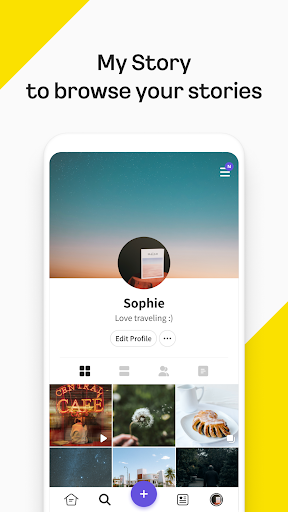
[My Story] is a private space where your everyday lives are piled up one by one.
Set news as Public, if you wish to make it known to everyone.
You can set stories you want to share with particular friends as Close Friends Only while selecting Only Me for stories that you wish to keep to yourself.
Beginning of all stories,
KakaoStory
====================
※ You can allow the following permissions to use KakaoStory more conveniently.
You can use the basic service without allowing optional permissions.
1. Required Access Permissions
(none)
2. Optional Access Permissions
* Storage(photos, videos): To retreve photos and videos from my device and send them to KakaoStory.
* Camera: To take photos and videos with my device.
* Mic: To take videos.
* Location: To receive suggestions for nearby places.
* Notifications: Permissions to receive notifications from friends, StoryChannels, and important announcements.
* The access permissions of the KakaoStory app are implemented by dividing the required and optional in response to Android 6.0 and later versions. Android OS lower than 6.0 does not allow optional permissions. Please check whether your device manufacturer provides the operating system upgrade function and update your OS to version 6.0 or higher, if possible.
How to Download KakaoStory APK
- Enter the package name
com.kakao.storyon the APK Downloader homepage. - Select your device architecture (ARM64 recommended for modern devices).
- Click Download to get the merged APK file.
- Transfer and install the APK on your Android device.
- Keep Updated: Visit APK Downloader regularly to search for and download the latest secure versions of your favorite apps.
Security & Signature Verification
This APK download is 100% safe. We verify that the cryptographic signature of the file matches the official developer credentials. No modifications or adware are injected.