
Download Sources
Device Configuration
Split APKs Installation Guide
Some apps are distributed as Split APKs (multiple .apk files packaged together) to optimize resources. Standard Android installers cannot open them.
Related Applications



What's New
Due to important changes, this app update will soon be a required update.
About this app
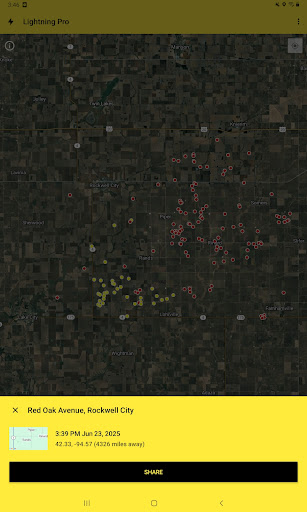
My Lightning Tracker is the best app for monitoring lightning strikes all around the world in close to real-time. With a sleek modern design, you can watch thunderstorms as they occur. You can also receive notifications whenever strikes are detected in your area.
- Detects and displays lightning strikes all around the world!
- See a history of hotspots where lightning strikes occur most often!
- View more detailed information about where the thunderstorm is occurring on a map, like Blitzortung and WeatherBug Spark.
- Receive a lightning alarm when a storm is nearby so that you can monitor it live.
- Share a strike with your friends so that they can see where the thunder & lightning is occurring too!
- Monitor the weather radar to track what could be coming.
- Full support for the latest versions of Android.
If you want the most efficient way of keeping up lightning strikes and thunderstorms, then My Lightning Tracker is the right lightning network for you. This app will let you know when a thunderstorm could be on its way. This version is ad-supported.
How to Download My Lightning Tracker & Alerts APK
- Enter the package name
com.jrustonapps.mylightningtrackeron the APK Downloader homepage. - Select your device architecture (ARM64 recommended for modern devices).
- Click Download to get the merged APK file.
- Transfer and install the APK on your Android device.
- Keep Updated: Visit APK Downloader regularly to search for and download the latest secure versions of your favorite apps.
Security & Signature Verification
This APK download is 100% safe. We verify that the cryptographic signature of the file matches the official developer credentials. No modifications or adware are injected.