
Download Sources
Device Configuration
Split APKs Installation Guide
Some apps are distributed as Split APKs (multiple .apk files packaged together) to optimize resources. Standard Android installers cannot open them.
Related Applications




What's New
Word and character counter
About this app
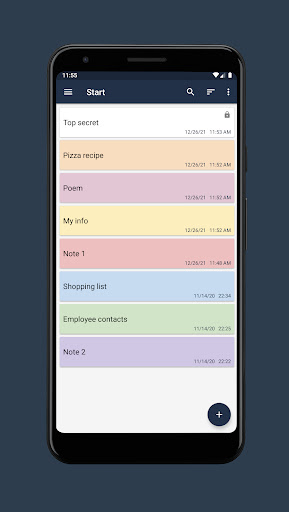
Features
• Create folders.
• Create notes in folders.
• Search for notes in notepad.
• Sort the list of notes.
• Highlighting notes in color.
• Setting a password for individual notes.
• Change the font size in the note window.
• Export notes to file (txt, pdf).
• Ability to share a note from a notepad.
• Highlighting URL links, email addresses and phone numbers with the ability to navigate through them.
• Dark theme.
• Autosave.
• Create a backup copy of your notepad.
• Restoring a notepad from a backup.
How to Download Notepad Notes APK
- Enter the package name
com.hlcsdev.x.notepadon the APK Downloader homepage. - Select your device architecture (ARM64 recommended for modern devices).
- Click Download to get the merged APK file.
- Transfer and install the APK on your Android device.
- Keep Updated: Visit APK Downloader regularly to search for and download the latest secure versions of your favorite apps.
Security & Signature Verification
This APK download is 100% safe. We verify that the cryptographic signature of the file matches the official developer credentials. No modifications or adware are injected.