
Download Sources
Device Configuration
Split APKs Installation Guide
Some apps are distributed as Split APKs (multiple .apk files packaged together) to optimize resources. Standard Android installers cannot open them.
Related Applications



What's New
Bug fixes and improvements
About this app
The Costco Mobile App is the easiest way to save time and money on the go. We've completely re-thought our mobile app and made it easier for members to access the incredible values found only at Costco.
• New! Your membership card is now available on the Costco app. Enter the warehouse and begin checkout at the register by using the Digital Membership Card on your phone.
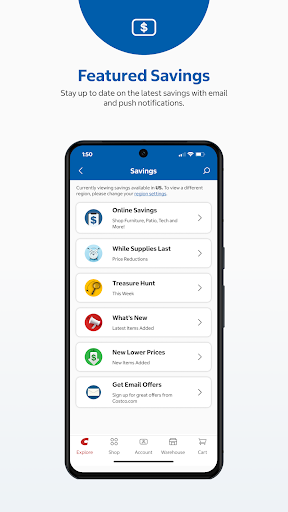
• SAVINGS: With the Costco Mobile App you'll always have the latest warehouse savings right on your device.
• SHOP: Members can shop Costco.com’s unique, expanded selection, offering thousands of items not found at your local warehouse, delivered straight to your door.
• WAREHOUSE INFO: See details about your nearest Costco including hours of operation and holiday hours, and navigate straight to the warehouse.
• SHOPPING LIST: Keep track of the items you want to pick up on your next trip to Costco.
• PHOTOS: Order prints, wall décor or photo gifts anywhere, anytime.
• PHARMACY: Order prescription refills & check status on prescriptions. Get refill reminders, track your medications, manage family accounts, transfer prescriptions, and find a Costco pharmacy.
• FEEDBACK: Costco is always looking for ways to improve your experience. Tap Feedback and tell us what you think of our mobile app, website or warehouse.
How to Download Costco Wholesale APK
- Enter the package name
com.costco.app.androidon the APK Downloader homepage. - Select your device architecture (ARM64 recommended for modern devices).
- Click Download to get the merged APK file.
- Transfer and install the APK on your Android device.
- Keep Updated: Visit APK Downloader regularly to search for and download the latest secure versions of your favorite apps.
Security & Signature Verification
This APK download is 100% safe. We verify that the cryptographic signature of the file matches the official developer credentials. No modifications or adware are injected.