
Download Sources
Device Configuration
Split APKs Installation Guide
Some apps are distributed as Split APKs (multiple .apk files packaged together) to optimize resources. Standard Android installers cannot open them.
Related Applications




What's New
Bug Fixes
About this app
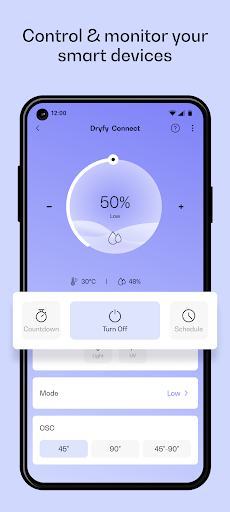
Connect smart Klarstein devices, control and monitor them remotely from everywhere in the world only through the Klarstein app.
Key features at your disposal in Klarstein App:
Connect your smart Klarstein devices in a couple of taps:
• Control and monitor your smart Klarstein devices using this app from everywhere, either from your office or travelling around the world. All you need is internet access.
• Depending on your smart device, seamlessly monitor the real-time temperature and humidity and set your desired parameter with only a few taps.
• Create different rooms in your apartment, e.g. living room, bed rooms, etc, and specify in which room your smart device is located. In this way, you can keep track of temperature and humidity in different areas of your apartment.
• Make a tour through the app with our guides! We make sure you know how to use the app and its different features.
Stay tuned with us:
• Find information about our upcoming sales.
• Stay in touch with our customer support and let us know how you like our app.
Some features may not be available for all products. We update the app regularly so you can get the most out of your products.
Send us a message: appsupport@go-bbg.com
• • •
Klarstein stands for innovative Modern Living products designed in Berlin. Klarstein's broad product range includes strong household helpers of all kinds: from kitchen appliances to home appliances to climate control products, everything is available. Through exciting colours, innovative technology and unique styles, the products of Klarstein fit seamlessly into the individual living ambience and become indispensable companions in the everyday life of our customers. At Klarstein, the slogan "time for variety" is both a claim and a guiding principle, which runs like a red thread through the entire product portfolio.
How to Download Klarstein APK
- Enter the package name
com.chaltec.klarsteinrnon the APK Downloader homepage. - Select your device architecture (ARM64 recommended for modern devices).
- Click Download to get the merged APK file.
- Transfer and install the APK on your Android device.
- Keep Updated: Visit APK Downloader regularly to search for and download the latest secure versions of your favorite apps.
Security & Signature Verification
This APK download is 100% safe. We verify that the cryptographic signature of the file matches the official developer credentials. No modifications or adware are injected.