
Download Sources
Device Configuration
Split APKs Installation Guide
Some apps are distributed as Split APKs (multiple .apk files packaged together) to optimize resources. Standard Android installers cannot open them.
Related Applications



What's New
Welcome to Creator v2!
Now you can easily switch between multiple accounts! Tap your profile photo on the top right of the screen and add more accounts by tapping “switch acounts”.
Questions? Reach out at @audiomack.
About this app
Growing your music career on Audiomack just got so much easier with our Creator App - you can do everything from uploading tracks and managing your releases, to seeing your artist stats and messaging your fans, all for free.
- Upload as many tracks as you want - we have unlimited storage for artists, no subscription or payment required. Use MP3s, WAV, M4A, AAC, and other local files, and share private listening links before your song is released.
- View stats on your releases like plays, favorites, playlist adds, and re-ups
- See what cities and countries your music is getting the most traction in, and who your top fans are
- See what your fans have to say about your tracks and directly reply to comments
- Message your followers - get feedback on your new releases, tease upcoming releases, share merch drops, invite them to your concerts
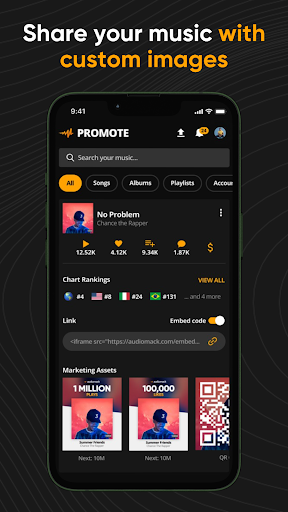
- Easily market your music with our Promote Tab (we auto-generate custom images for you to share on social media)
- Earn money from your streams directly from us through our Artist Monetization Program, no distributor or label required
- Monetize beyond streams - release music early and have fans pay to listen before the official release
Audiomack is the best app for emerging artists to be discovered - we care about what artists are bubbling next, not just what’s big now, and artists like Yeat, Rod Wave, and Joeboy launched their careers on Audiomack. We want to help you get discovered by your future fans - we have a global network of curators who hand select music to trend, and we have programs like Tastemakers where we engage music lovers worldwide to help find cool new artists.
Use of the Audiomack App and free upload feature is subject to your agreement with our Privacy Policy/TOS.
Privacy Policy: http://www.audiomack.com/privacy-policy
TOS: http://www.audiomack.com/about/terms-of-service
How to Download Audiomack Creator-Upload Music APK
- Enter the package name
com.audiomack.creatorson the APK Downloader homepage. - Select your device architecture (ARM64 recommended for modern devices).
- Click Download to get the merged APK file.
- Transfer and install the APK on your Android device.
- Keep Updated: Visit APK Downloader regularly to search for and download the latest secure versions of your favorite apps.
Security & Signature Verification
This APK download is 100% safe. We verify that the cryptographic signature of the file matches the official developer credentials. No modifications or adware are injected.