
Download Sources
Device Configuration
Split APKs Installation Guide
Some apps are distributed as Split APKs (multiple .apk files packaged together) to optimize resources. Standard Android installers cannot open them.
Related Applications




What's New
Bug fixes
About this app
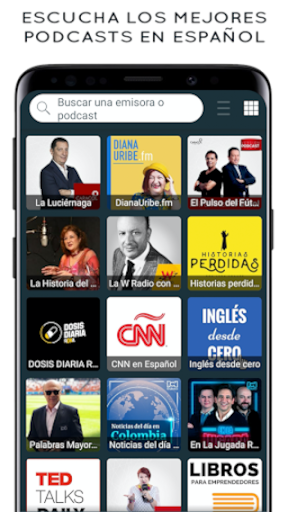
Radio Colombia is a free radio app with more than 1000 radio stations. With a modern, beautiful and easy to use interface, Radio COL gives you the best experience when it comes to listening to FM radio and internet radio.
With Radio Colombia you can listen to the best online radio stations and follow your favourite shows and podcasts for free. You can choose amongst sports, news, music, comedy and more.
📻 FEATURES
● listen to radio in background while using other apps
● you can listen to FM radio even if you are abroad
● find out which song is currently playing on the radio (depending on the station)
● the interface is really easy to use, with just one click you can add a radio station or podcast to your favourites list
● use the search tool to easily find what you're looking for
● set an alarm to wake up with the FM radio station you love
● set a sleep timer to turn the app off
● you can choose between light or dark mode interfaces
● don't need to connect the headphones, listen through the smartphone's loudspeakers
● compatible with Chromecast and Bluetooth devices
● share with friends via Social Media, SMS or Email
🇨🇴 1000 Colombia radio stations:
Caracol Radio
BLU Radio
Olimpica Stereo
Radio Tiempo
RCN Radio
La W Radio
La Mega
RadioAktiva
La FM
Tropicana
La X
Los 40 Principales
Vibra FM
Coca Cola FM
Besame Medellin
Antena 2
La 92
Radio Uno
La Z Urbana
Estrella Estéreo
Candela Estéreo
Radio Fantastica
Amor Stereo
Melodía Stereo
Radio IPUC
Radio Policia Nacional
Radio Kronos
and many more FM radio stations.
ℹ️ SUPPORT
For a quick and more effective communication, if you experience any problems or if you can't find the station you are looking for, send us an email to appmind.technologies@gmail.com and we will try to add that radio station as soon as possible, so that you don't miss out your favourite music and shows.
If you like the app, we would appreciate a 5 stars review. Thank you!
Note: An internet connection, 3G/4G or WiFi network is required to tune in radio stations. There may be some FM radio stations that do not work because their stream is temporarily offline.
How to Download Emisoras Colombianas APK
- Enter the package name
com.appmind.radios.coon the APK Downloader homepage. - Select your device architecture (ARM64 recommended for modern devices).
- Click Download to get the merged APK file.
- Transfer and install the APK on your Android device.
- Keep Updated: Visit APK Downloader regularly to search for and download the latest secure versions of your favorite apps.
Security & Signature Verification
This APK download is 100% safe. We verify that the cryptographic signature of the file matches the official developer credentials. No modifications or adware are injected.