
Download Sources
Device Configuration
Split APKs Installation Guide
Some apps are distributed as Split APKs (multiple .apk files packaged together) to optimize resources. Standard Android installers cannot open them.
Related Applications




What's New
Bug fixes and performance improvements
About this app
Seen a photo and thought: “Where is this?”
GeoFinder is built to answer that—fast.
How GeoFinder works
Upload a photo
Add a few quick details (optional but powerful): country guess, city hint, category, time period
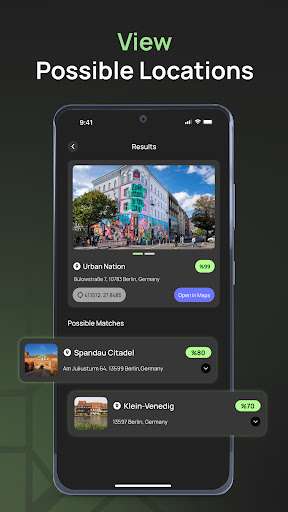
GeoFinder analyzes the image and returns the most likely location matches
From travel memories to places you spotted online, GeoFinder helps you identify locations from a single image and narrow down the best candidates.
What you get
Find a location from a photo: One image in, likely places out.
Hint-assisted accuracy: Your inputs improve relevance and confidence.
Ranked results: Top matches first, based on confidence.
Clean, quick flow: Upload → Analyze → Results.
Perfect for
Finding the exact spot in your travel photos
Discovering places you saw on social media
Organizing old photos by location
Solving “Which landmark / street / beach is this?” instantly
Privacy, clearly
Photos are processed only to generate results.
You control what happens next: save results or use it one-time.
GeoFinder is for location discovery, not surveillance.
Note: Results can vary depending on photo quality, angle, lighting, and available visual matches. GeoFinder provides the most probable matches.
How to Download GeoFinder - Explore the World! APK
- Enter the package name
co.twowise.geofinderon the APK Downloader homepage. - Select your device architecture (ARM64 recommended for modern devices).
- Click Download to get the merged APK file.
- Transfer and install the APK on your Android device.
- Keep Updated: Visit APK Downloader regularly to search for and download the latest secure versions of your favorite apps.
Security & Signature Verification
This APK download is 100% safe. We verify that the cryptographic signature of the file matches the official developer credentials. No modifications or adware are injected.