
Download Sources
Device Configuration
Split APKs Installation Guide
Some apps are distributed as Split APKs (multiple .apk files packaged together) to optimize resources. Standard Android installers cannot open them.
Related Applications




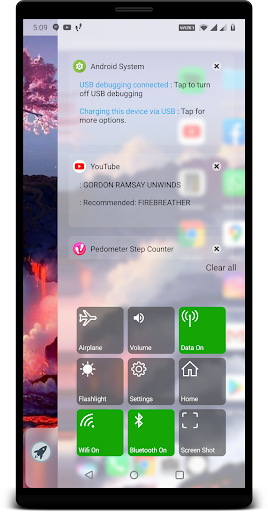


About this app
Original oS X Style Computer Launcher with 30+ functionalities which will save your 5x time and effort , install now and you won't resist to use all time.
Get os Style Launcher on your Android , Why to have old fashioned launcher when you can have m os launcher in your hand , Check out the new computer launcher for your Android smart phones
Your friends will be jealous with this new look style m os 14 Launcher.
Make your android phone look like .m os 14
This Launcher will exactly give you feel of Desktop launcher for m os 14 with Custom Desktop Computer customizations
Desktop m os Launcher
Get m os style File Manager where you can search and explore all your apps , contacts , google search , google maps and more
Top Features:
- Start Menu like oS x
- Window 10 tile look
- Create shortcuts on oS x
- Create contacts on oS x
- Place apps on oS x
- Drag and Drop
- Most used apps list
- 18 app categories with 2million apps data
- Easy access and search to the Apps
- Get details of all of your drives, SD Card, Storage, audio and video files and pictures in oS x
style
- Computer Launcher Taskbar exact look
- Get notify when a notification comes by using Computer Launcher Notifyer with number counter
- Place Widgets on desktop , resize , drag drop
- Add home page
- Drag and drop for all actions
- Clock Widget on desktop and taskbar
- Weather Widget
- News Widgets
- Rename desktop folders
- Live Premium Wallpapers and Themes
- Weather, Calendar and Photos tiles Added
- Unlimited Themes
- Lock Screen Feature
- Hide App Feature
- Multi Color Support for Desktop,Start Menu and Task bar
- Themes and Icon Pack
- Change applications in Taskbar (Drag Drop)
Accessibility API Requirement : Enable Accessibility Service to perform global actions like going back, opening notifications taking screen shot, double tap to lock screen. Please be assured that XOS Launcher will not collect any personal information
How to Download oS X 14 Launcher Prime APK
- Enter the package name
apptech.os.launcher.primeon the APK Downloader homepage. - Select your device architecture (ARM64 recommended for modern devices).
- Click Download to get the merged APK file.
- Transfer and install the APK on your Android device.
- Keep Updated: Visit APK Downloader regularly to search for and download the latest secure versions of your favorite apps.
Security & Signature Verification
This APK download is 100% safe. We verify that the cryptographic signature of the file matches the official developer credentials. No modifications or adware are injected.