
Download Sources
Device Configuration
Split APKs Installation Guide
Some apps are distributed as Split APKs (multiple .apk files packaged together) to optimize resources. Standard Android installers cannot open them.
Related Applications


What's New
Optimize user experience
About this app
OnSpace AI – Build powerful AI apps in minutes. No coding needed.
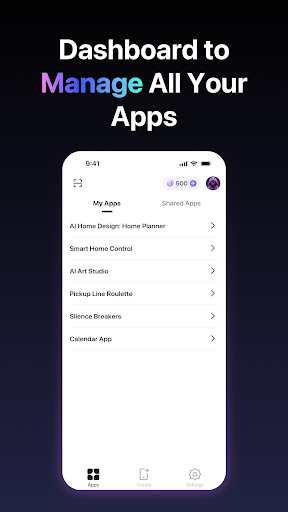
Turn your ideas into powerful AI apps in minutes—no coding needed! OnSpace AI’s free, no-code platform lets you create custom AI applications effortlessly. Just describe your vision, and our agentic AI handles the rest—UI, logic, data, and deployment across Android, and Web.
Why OnSpace AI
- Zero Coding Required – Anyone can build
- Fast & Easy – From idea to app in minutes
- AI-Powered – Smart automation does the work
- Fully Customizable – Tailor apps to your needs
- Cross-platform native UX – Smooth on Android
Key Capabilities
- Native UI/UX – Polished, responsive interfaces
- Cross-platform Development – Android support
- User Authentication – Email/OTP/social login
- Secure Backend Endpoint – API key–protected (e.g., Claude)
- APK Download – Easy Android install
- Custom Domain Publishing – Publish to your own domain (Developing)
Powered by Spaces (Alpha) – Instant Serverless Backend
Spaces is OnSpace’s built-in backend that gives you a production-ready stack with zero setup:
- Instant setup and zero maintenance
- Managed PostgreSQL with Row Level Security and real-time sync
- File Storage for images and documents with automatic optimization
- Edge Functions for custom business logic and secure APIs
- Visual Dashboard for data operations, user management, and monitoring
- Familiar APIs/SDKs (Supabase-like) with full TypeScript support
Get started
Download now and start creating AI apps for free!
Support and Policies
For help Email: contact@onspace.ai
Privacy Policy: https://auth.onspace.ai/privacy-policy
Terms of Use: https://auth.onspace.ai/terms-of-use
How to Download OnSpace AI:Mobile App Builder APK
- Enter the package name
app.onspace.aion the APK Downloader homepage. - Select your device architecture (ARM64 recommended for modern devices).
- Click Download to get the merged APK file.
- Transfer and install the APK on your Android device.
- Keep Updated: Visit APK Downloader regularly to search for and download the latest secure versions of your favorite apps.
Security & Signature Verification
This APK download is 100% safe. We verify that the cryptographic signature of the file matches the official developer credentials. No modifications or adware are injected.